
A welding cell succeeds or struggles long before the robot makes its first weld. A practical approach to welding cell installation australia starts with your parts, existing equipment and workshop conditions, not a robot in isolation. Review the repeat work you want to automate, how parts are held and moved, and where a collaborative cell could fit into the current workflow.
It’s reasonable to ask whether your parts suit automation, how installation could affect production, or whether your team needs specialist programming skills. These questions belong in the planning process. No coding experience is needed to use the no-code teaching software, so welders and operators can teach and refine weld paths. The robot, welding power source, torch package and fixtures still need to be integrated for the application.
This 2026 guide covers the production information to prepare, how equipment and fixtures fit into integration, and what operator teaching and onboarding involve. It also explains how TME Systems’ Mobile Demo System brings a welding cell to your site for evaluation in your production environment. The aim is to help you assess a practical next step with your production needs and people at the centre.
Key Takeaways
- For welding cell installation australia, start by identifying repeatable weld tasks, how parts are handled and where changeovers affect the workflow.
- Consider the robot, welding power source, torch package and fixtures as one integrated system. Weld settings and power-source communication affect arc stability and repeatability.
- Choose a cell configuration around the parts, handling needs and changeovers you need to support, rather than adding equipment that the task doesn’t require.
- Plan operator teaching and onboarding as part of adoption. No coding experience is needed to use the teaching software.
- Include a site-specific risk assessment covering the application, tooling, welding process and workshop environment.
Welding cell installation in Australia starts with production fit
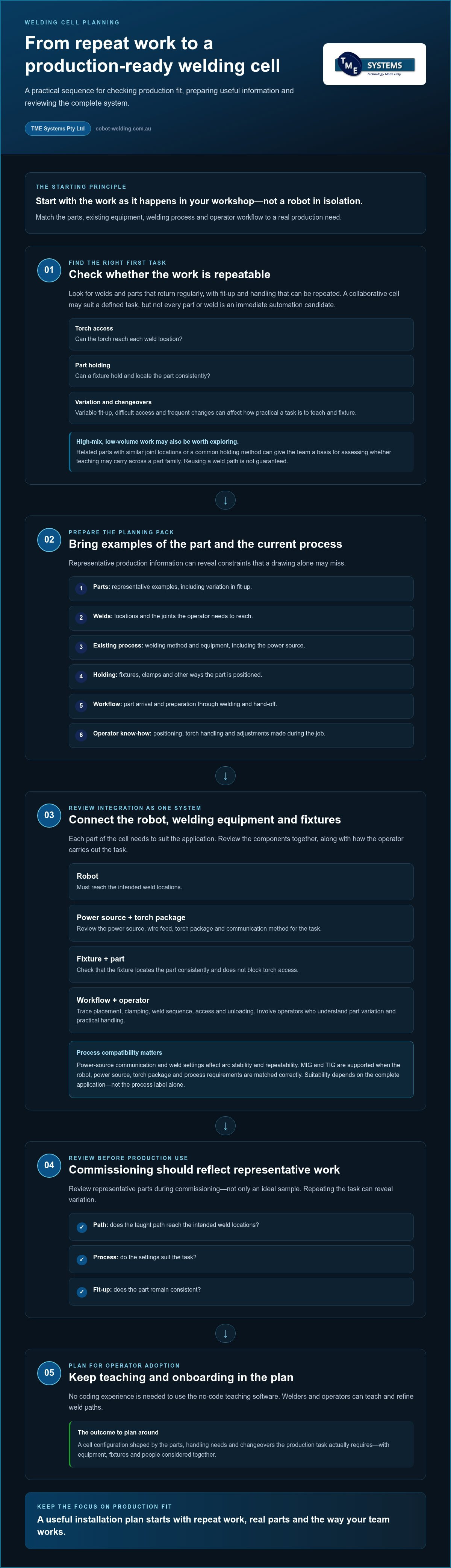
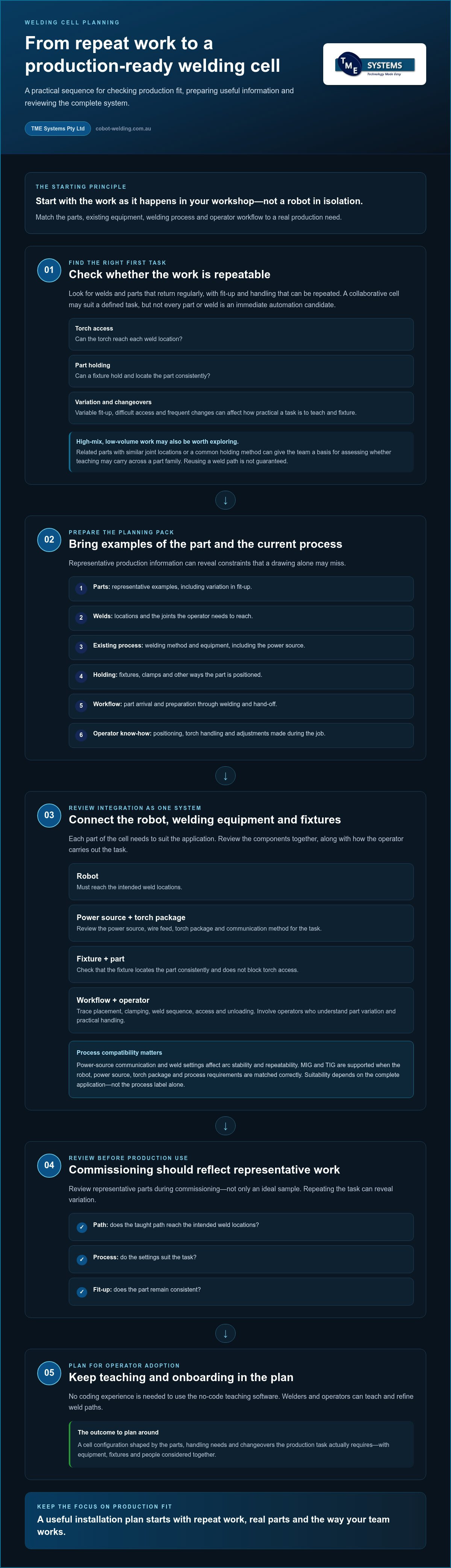
How will a welding cell fit the work already happening in your workshop? That’s the practical starting point for welding cell installation australia. Before choosing a configuration, identify which welds repeat, how parts are loaded and held, and how operators move through the task. The goal is to support a real production need, not to force every job into a new process.
Production fit means matching the parts, welding process, existing equipment and operator workflow to the work as it’s actually done. A collaborative cell may suit a defined, repeatable task, but that doesn’t make every part or weld an immediate automation candidate. Variable fit-up, difficult torch access and frequent changes can all affect how practical a task is to teach and fixture. A broad overview of welding methods and considerations is available in What is Welding?
Which welding jobs are sensible candidates for a first cell?
Start with parts that return to the workshop regularly and have repeatable fit-up. Check whether the torch can reach each weld location and whether a fixture can hold the part consistently. Repeat work gives the team a clear task to teach and prove, rather than requiring a fresh setup for every component.
High-mix, low-volume work may also be worth exploring. Related parts can share useful features, such as similar joint locations or a common way of holding the work. That doesn’t guarantee the same weld path can be reused, but it gives the team a basis for assessing whether teaching can carry across a part family.
What production information should be ready for planning?
Bring examples that show both the part and how it’s welded today. A useful starting pack includes:
- Representative parts, including examples that show variation in fit-up.
- Weld locations and the joints the operator needs to reach.
- Details of the existing process and welding equipment, including the power source.
- Current fixtures, clamps or other methods used to position and hold each part.
- A description of the workflow, from part arrival and preparation through welding and hand-off.
- Notes on how the operator positions the part, handles the torch or makes adjustments during the job.
These details can reveal constraints a drawing alone may miss. A part may look straightforward on paper, for example, but its fixture could obstruct torch access or the operator may need to reposition it between welds. Reviewing collaborative robot welding cells can help clarify how the robot, operator and workpiece fit together. With representative parts and process information in hand, planning can focus on a realistic first application rather than assuming the whole workshop needs to change at once.
How welding cell installation brings the robot, power source and fixtures together
A welding cell is a connected working system, not simply a robot placed beside a welder. Installation planning brings the robot, welding power source, torch package, fixtures and operator workflow into one review. Each element needs to suit the task: the robot must reach the weld, the fixture must locate the part consistently, and the welding equipment must support the required process.
Power-source communication and weld settings matter because they affect arc stability and repeatability. The integration discussion should cover how the power source is controlled, how settings are established and whether the torch package suits the task. MIG and TIG are supported when the robot, power source, torch package and process requirements are matched correctly. Suitability depends on the complete application, not the process label alone.
How existing welding equipment and fixtures fit the cell
Review the existing power source, wire feed, torch package and communication method as part of the system. Then check how the fixture holds the part and whether it locates it consistently from cycle to cycle. If the part shifts or the fixture blocks torch access, the setup and taught path may need refinement. Existing equipment can be included in the integration discussion, with the fit assessed for the specific combination.
Trace the whole task early: part placement, clamping, weld sequence, access and unloading. This helps identify potential fixture or workflow adjustments before the cell is introduced. An early integration review brings equipment, fixtures and workflow into view, helping surface commissioning considerations before production use. For broader context on connecting equipment and processes, the welding system integration guide explores the role of integration in fabrication.
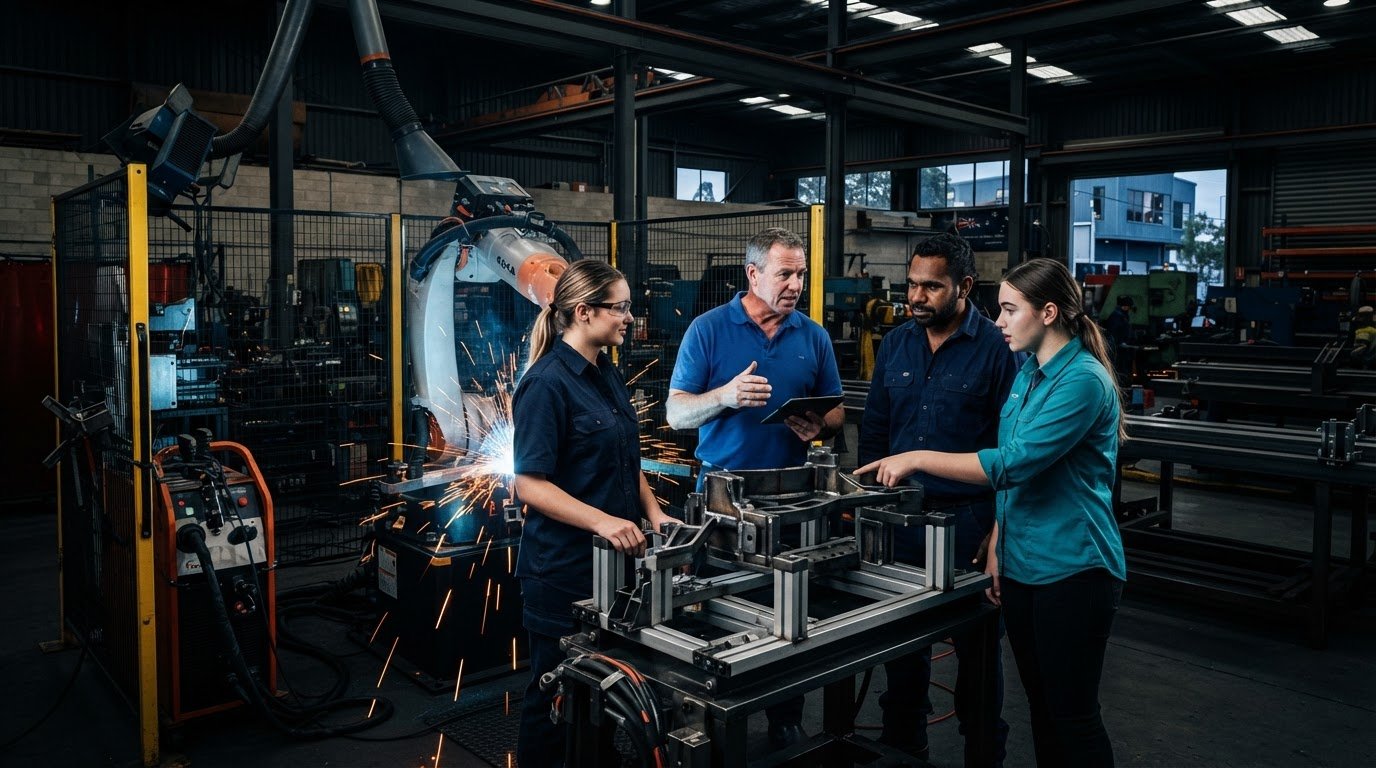
Keep the operator involved in these discussions. Their knowledge of part variation, access and practical handling can help shape a setup that works beyond a demonstration. Australian welding competency information, such as the Australian Welding Competency Standards, provides context for the skills and knowledge used in welding operations.
What commissioning needs to prove before production use
Review representative work during commissioning, not just an ideal sample. Check whether the taught path reaches the intended weld locations, whether the process settings suit the task and whether part fit-up remains consistent. Repeating the task can reveal variation that a single run would not show.
- Check the taught path against the actual part and weld locations.
- Review process settings and the resulting weld with the relevant production team.
- Repeat the task to assess consistency across representative parts.
- Ask operators to review access, loading, unloading and the practical sequence.
Use this stage to capture refinements and clarify how operators will run the task day to day. Training and onboarding help operators build familiarity with the collaborative cell and their role in the process. Information about collaborative robot welding options can be considered alongside your existing equipment and fixtures.
Choosing a welding cell configuration without overbuilding
A larger or more complex cell isn’t automatically a better fit. For welding cell installation australia, the configuration should follow the parts, weld tasks and operator workflow you need to support. Starting with a generic equipment checklist can add complexity without addressing the production task.
Compare possible approaches against the work itself. A standardised approach may suit a stable task with predictable part handling. A tailored integration may suit work where part families, fixtures or existing welding equipment create specific requirements. These are planning approaches, not fixed cell sizes or promises about performance.
| Planning factor | Standardised approach may suit | Tailored integration may suit |
|---|---|---|
| Production fit | A defined, recurring weld task | Different tasks or related part families with varied requirements |
| Part handling | Parts are presented and located consistently | Part orientation or holding arrangements vary between jobs |
| Changeovers | The workflow changes infrequently | Operators regularly switch between parts, fixtures or weld sequences |
| Integration scope | Existing equipment and workflow align with the task | Power source, torch package, fixtures or process need a more considered fit |
When a standardised approach may suit the work
Predictable production and part handling are useful starting points when discussing a standardised setup. Consider whether parts arrive in a consistent condition, whether the fixture locates them reliably and whether the operator follows a repeatable sequence. Even a recurring job needs to fit the production environment, including how the cell sits alongside current work. Suitability comes from that match, not from a label.
When production needs call for a tailored integration
More variation doesn’t rule out collaborative welding, but it can change the integration discussion. Consider part families, fixture arrangements, weld access and existing equipment together. The setup must work with the power source and torch package as well as the robot arm, and the operator’s approach to changing parts matters too.
Operator-led teaching is another configuration consideration. No coding experience is needed to use the teaching software, so welders and operators can take part in teaching and refining tasks. The no-code robot welding software guide explains how this approach can support practical involvement from the workshop team.
Use the table as a prompt for discussion, not a substitute for evaluating representative work. A collaborative welding cell should be configured around the task and the people who will run it. Robotics Australia Group’s perspective on the Robotics Industry in Australia offers broader context, while reviewing parts, equipment and workflow keeps the decision grounded in your operation. Information on collaborative welding cell options can also inform that evaluation.
Preparing operators, workflow and site risk assessment for installation
Does a welding cell require someone who can write robot code? No. No coding experience is needed to use the teaching software. For welding cell installation australia, operator readiness is less about specialist programming and more about understanding how to teach, run and refine a weld task within the planned workflow.
That transition works best when operators are involved early. They know how parts are handled, where access is awkward and which adjustments matter during a normal shift. Their input can shape an approach that reflects workshop practice, rather than asking people to adapt to a process they had no part in planning.
How no-code teaching supports operator adoption
The software is designed for welders and operators regardless of robot programming experience. An operator can teach a weld path, review how it follows the joint and refine it as needed. Their process knowledge becomes part of setting up the task. The robot still needs to be integrated with the welding equipment, power source and fixtures required for the application.
Introduce teaching around a representative job. An operator can walk through the part’s position, intended weld sequence and access considerations, then help assess whether the taught path reflects the task. This keeps the focus on a useful production process, not on learning abstract robot programming. On-site cobot welder training can help frame how hands-on learning fits into operator adoption.
How onboarding connects the cell to daily production
Demonstration, onboarding, training and ongoing support help a team move from evaluation towards everyday use. Training should connect the cell to the work operators will actually perform, using suitable parts and fixtures to practise the intended sequence.
- Walk through the planned workflow, including how parts are presented and handled.
- Practise teaching and reviewing the weld path on representative work.
- Give operators a chance to identify access or handling issues before routine use.
- Discuss how the team will run the task and refine it as production needs change.
Safety needs careful, site-specific planning. A collaborative robot label doesn’t guarantee that an application is safe. Risk assessment depends on the specific application, tooling, welding process and site environment, including how people interact with the cell during the work. The assessment should inform cell design and operator training, rather than being treated as a final tick-box step. Any Australian workplace requirements or standards referenced in an installation plan should be checked against current authoritative sources.
Involving operators in planning, teaching and onboarding helps make installation a practical production change, not just an equipment handover. An operator-led welding cell evaluation can be structured around your parts, workflow and team.
Plan your Australian welding cell installation with TME Systems
A practical next step for welding cell installation australia is to turn the production question into a focused evaluation. TME Systems reviews the application with you, considering representative parts, production goals, existing welding equipment, fixtures and operator workflow. This helps establish how a collaborative cell could fit the work and what a practical path from evaluation to onboarding might involve.
You don’t need a perfect project specification to begin. A clear picture of the task and workshop constraints is more useful than a list of robot features. Include the people who understand the weld and how parts move through the job. Their experience keeps the discussion grounded in production.
What to bring to an initial installation discussion
Prepare a representative set of parts and note what makes each weld task typical or challenging. Include the weld requirements, current process details, existing power source and torch package, and information about the fixtures used to position parts. Describe any variation between batches or occasions when the part needs repositioning during welding. These details make the integration discussion specific to your work.
It also helps to explain what you want to improve. Is the goal to support a recurring weld task, create a more repeatable process or give operators a practical way to teach and refine weld paths? Describe the workflow as it happens, including hand-offs, operator involvement and where the task creates pressure in production. TME Systems discusses welding system integration around existing equipment, power sources and fixtures, rather than treating the robot arm as the whole solution.
Evaluate the process with a mobile demonstration
An on-site evaluation lets you consider the cell in the production environment that matters. TME Systems’ Mobile Demo System brings the welding cell to your site for evaluation. It’s an opportunity to explore how representative work, operator interaction and workshop conditions affect the fit of a collaborative welding application. The Mobile Demo System is for evaluation, not a permanent installation.
Use the demonstration to assess the task with your team. Operators can observe how the cell relates to the part and fixture, discuss the workflow and consider what teaching and onboarding would involve. The evaluation can inform next steps, including how the robot, power source and torch package need to integrate with the application. It doesn’t replace a site-specific risk assessment or establish that every part is suitable.
A clear sequence keeps the process manageable: identify representative parts, discuss production goals, review integration, evaluate the application and plan operator onboarding. This gives TME Systems and your team a practical basis for deciding what a first cell needs to support, without assuming a fixed installation schedule or outcome.
A mobile welding cell demonstration brings the application into your production environment for evaluation.
Make your first cell a practical step forward
The best next move isn’t committing to a complete production change. Choose a real task and use it to guide a grounded conversation about what your team needs from collaborative welding. That gives operators a role in shaping the process and keeps decisions tied to workshop priorities.
With welding cell installation australia, a first cell can also help build confidence and capability within the team. TME Systems’ no-code teaching software is designed for welders and operators without robot programming experience. The Mobile Demo System brings a cell to your site for evaluation, while demonstration, onboarding, training and support help operators approach adoption with practical guidance.
Bring your production goals and a representative task into the next discussion. You’ll have a clearer basis for exploring whether collaborative welding fits your operation and what a sensible path forward could look like.
Discuss your welding cell installation with TME Systems and take the next step with your people and production needs at the centre.
Frequently Asked Questions
Is coding experience required for using the software?
No, the software is designed for welders and operators regardless of robot programming experience. A welder’s knowledge of the joint and preferred welding approach remains valuable when setting up a task. For example, the person who knows where a weld starts and finishes can help check that the taught path follows the intended sequence. The interface supports operator involvement without requiring them to write robot code.
Can the software be integrated with existing welding equipment?
Yes, TME Systems can discuss integration with a wide range of welding equipment, fixtures, and production processes. The software is part of a wider welding setup, not a standalone replacement for equipment integration. Identify the power source and torch package already in use, along with the fixture and process requirements, to make the discussion specific. The elements need to be considered together for the application.
Is collaborative robot welding safe for workers?
Designed around controlled interaction with operators; final safety requirements depend on the application, tooling, process, and site risk assessment. A collaborative robot’s label alone doesn’t establish that a welding setup is safe for every task. The assessment needs to consider the complete application and the work environment where the cell will be used. Treat safety planning as part of evaluating the proposed setup, not as an assumption based on the robot alone.
What parts are good candidates for robotic welding?
Parts with repeatable fit-up, sensible torch access, stable fixturing, and enough repeat work to justify teaching and proving the weld path. A useful example is a component that returns regularly and can be positioned consistently for the same weld sequence. If every part needs substantial adjustment or the joint is difficult to reach, those factors may make the task less straightforward to automate. Reviewing real parts helps clarify suitability.
Can a cobot help with high-mix low-volume welding?
Yes, provided the right part families are chosen; no-code teaching can make changeovers more practical when jobs are similar enough to reuse fixtures, process knowledge, and weld strategies. Related components may share joint positions or a familiar setup, even if they aren’t identical. Each family still needs a practical assessment, since differences in fit-up, torch access or fixturing can affect whether previous teaching remains useful.
Does robotic welding support MIG and TIG processes?
Yes, when the robot, power source, torch package, and process requirements are correctly matched. The process name alone doesn’t determine whether a setup is suitable. Consider the welding equipment and application together, including the requirements of the intended weld task. If you’re evaluating MIG or TIG, describe the process and existing equipment so integration can be discussed in the context of the parts you plan to weld.
How can I get started with Cobot Welding?
Contact TME Systems to discuss parts, production goals, and whether a mobile demonstration is the right next step. You can begin with one representative component and describe what you want to improve about its welding task. The Mobile Demo System brings the welding cell to your site for evaluation, giving your team a way to consider the application in its production environment before planning further.