
Remote support for welding cobots can help teams maintain consistent weld quality by letting specialists review the cell setup and guide adjustments as production needs change. It complements, rather than replaces, operator checks. Operators can recall a saved weld program from the control panel to repeat established settings for a workpiece.
It’s reasonable to ask how support can help once a cobot is on the workshop floor. Changes to materials, joints or production requirements may call for a closer look at the weld path and parameters, while operators remain central to assessing the result.
This article explains what remote assistance can support over time, how it relates to weld consistency, and what to consider for safe operation in Australia. It also looks at how no-code teaching software, welding system integration and operator onboarding can fit into your support plan, helping you identify a practical next step for production.
Key Takeaways
- Remote access can help review a cobot’s setup and guide adjustments as production needs change, while operators remain responsible for checking weld results.
- Useful support starts with a clear fault description, the affected workpiece and weld program, and what changed before the issue appeared.
- Plan access controls and cybersecurity processes around who can connect, what they can access and how remote sessions are managed.
- In Australia, collaborative welding installations require a safety assessment against ISO 10218-2 and ISO/TS 15066, and welders should continue using personal protective equipment.
- Response timing depends on factors such as the issue, the information available and the support arrangements in place, so clarify how requests are handled before production depends on them.
Remote access for ongoing support
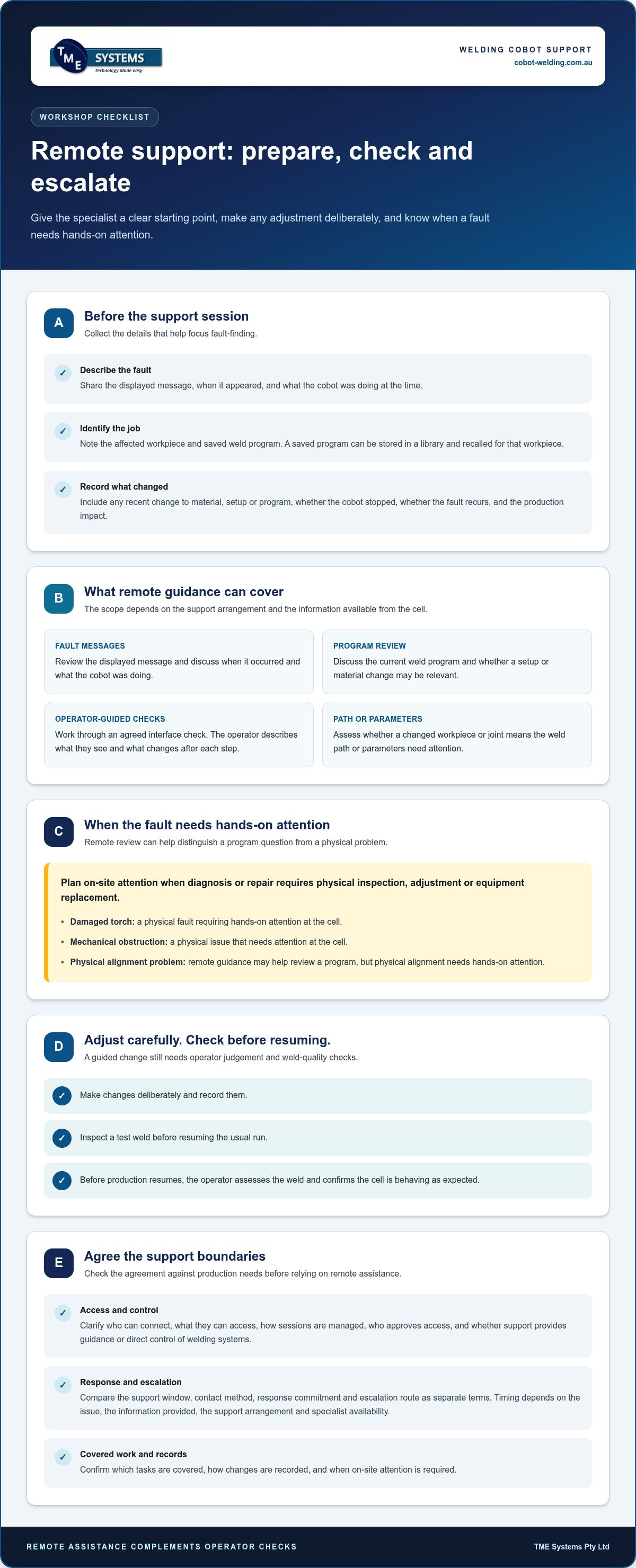
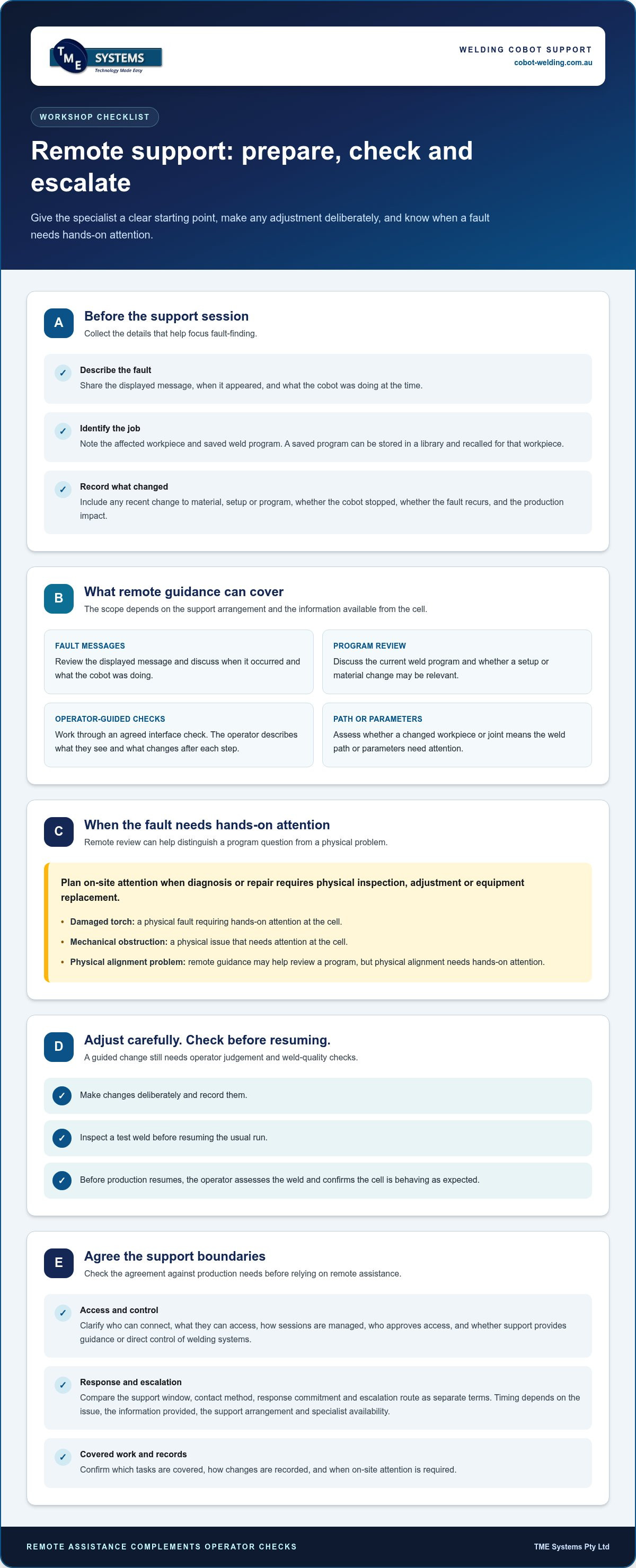
When assessing remote support for welding cobots, check the agreement for access controls, covered tasks, response arrangements, escalation steps and circumstances requiring on-site attention. Compare these terms with your production schedule and the faults that could stop the cell.
Remote and on-site support
Remote support lets a specialist review available system information and guide an operator through checks without travelling to the workshop. On-site attention is needed when diagnosis or repair requires physical inspection, adjustment or equipment replacement. The fault determines which approach fits: a program question may suit a remote session, while a damaged torch or mechanical obstruction needs hands-on attention at the cell.
Both approaches can complement skilled welding. Before production resumes, the operator should assess the weld and confirm the cell is behaving as expected. If a workpiece change appears to have shifted the weld path, remote guidance may help review the program. A physical alignment problem needs hands-on attention. This distinction helps businesses plan escalation instead of treating every stoppage alike.
Remote support inclusions
Remote assistance may include reviewing fault messages, discussing the current program, guiding an operator through the interface and assessing whether a setting or material change is relevant. Before a session, the operator can gather details about the workpiece, weld program, displayed error and events preceding the fault. This gives the specialist a clearer starting point.
Support can also guide a team through a controlled adjustment. For example, a welder can describe a change in joint fit-up while a specialist helps assess whether the weld path or parameters need attention. Make changes deliberately, record them and inspect a test weld before resuming the usual run. This supports consistent results without treating automation as a substitute for welding judgement.
The support agreement should distinguish guidance from direct control of welding systems. It should explain how remote access is approved, who can authorise a session and how changes are recorded. Clear terms help operators, supervisors and technical support staff understand their responsibilities.
Response times for support requests
No single response time applies to every Australian supplier or fault. Timing depends on the support arrangement, the issue’s urgency, the information provided and whether a specialist with relevant system knowledge is available. A clear agreement should explain how requests are prioritised and how the supplier communicates the next step.
Help support staff assess the issue by including the cell configuration, fault message, workpiece and production impact in your request. Note whether the cobot has stopped, whether the fault recurs and whether the operator recently changed a program. Avoid further adjustments while the cause is unclear. If remote checks point to a physical fault, the escalation process should explain how on-site attention is arranged.
Compare the support window, contact method, response commitment and escalation route as separate terms. A quick acknowledgement is not the same as resolving a fault. Clear definitions help production teams plan around downtime and maintain weld quality checks before restarting.
What does remote support for welding cobots typically include?
Remote assistance often focuses on diagnosing faults, reviewing programs and guiding operators through practical checks. Its scope depends on the support arrangement and the information available from the cell. To get started, describe the fault, identify the affected workpiece and note any recent changes to material, setup or weld program.
For example, an operator can report an alarm and say whether it appears at startup or during a weld. A specialist can help interpret the message and guide the operator through relevant checks at the interface. This can help determine whether the issue relates to a program, a setup change or a physical fault requiring attention at the cell. Remote support for welding cobots can make fault-finding more focused when the operator clearly describes what they see.
- Fault diagnosis: Share the displayed message, when it occurred and what the cobot was doing. This gives the support specialist a clear starting point.
- Program review: Identify the saved weld program and the workpiece it serves. A saved program can be stored in a library and recalled for that workpiece.
- Operator guidance: Work through an agreed check at the interface, with the operator describing what they see and what changes after each step.
- Escalation: Record when remote checks point to a physical problem, such as an obstruction or damaged component, so the next response can address the cause.
Programming guidance can help teams assess a proposed change before applying it in production. Offline programming can be used to create and test welding programs without interrupting ongoing production. For instance, a team switching to a different joint or workpiece can consider the program separately, then validate the finished weld before normal production. Operators must still assess weld quality: remote guidance doesn’t replace their judgement.
Before relying on remote assistance, define its practical boundaries in the support agreement. Clarify which faults and programming questions are covered, how operators request help, what information they should provide and how changes are documented. Also specify when work must stop and the issue escalated for physical inspection. Businesses considering remote support for welding cobots should make these responsibilities clear before production depends on the arrangement.
If you’re planning a new cell or connecting a cobot to existing equipment, welding system integration is relevant to how the system, operator interface and production process fit together. Clear integration planning can give operators a more straightforward path from initial setup to ongoing adjustments.
How is remote support for welding cobots secured, including access controls and cybersecurity?
Remote access can help diagnose a welding cell, but it also connects to production equipment. Treat each support session as a controlled task: decide who can approve it, what the specialist can access and how the operator will supervise the work. These boundaries help prevent a fault-finding session from becoming unrestricted access to the workshop network.
Use individual accounts rather than shared logins so it’s clear who connected and when. Ask how identity is verified, how access is granted and how a worker can end a session if the task changes. Multi-factor authentication adds an identity check, while time-limited access can close the connection when the support task is complete.
Set permissions according to the task. A specialist reviewing an alarm may not need permission to edit a weld program or change cell settings. If changes are necessary, agree on them with the operator, record what was altered and test the result before resuming the normal run. Keep production approval with the people responsible for the cell.
- Session approval: Require an authorised site representative to approve each connection and know when it begins.
- Limited access: Restrict the session to the relevant cobot, controller or interface rather than the wider business network.
- Visible activity: Ensure the operator knows what the remote specialist is viewing or changing.
- Session records: Keep a record of access, actions taken and any program or parameter changes.
- Access removal: Remove accounts when a person no longer needs them, and close access after support work.
Network separation is another practical consideration. Keeping the welding cell’s connection distinct from office systems can limit the reach of a problem. For example, a support connection to the cobot controller should not automatically provide access to shared business files. Discuss how the connection is established, which devices it can reach and who manages those boundaries.
Before approving remote support for welding cobots, map the session from request to close. Identify who approves it, who is at the cell, which actions are permitted and where to escalate if anything unexpected occurs. If the specialist needs to edit a program, pause the normal process and agree how the operator will validate the result. A written process helps different shifts follow the same controls.
Make cybersecurity responsibilities clear in the support agreement. Specify who manages user access, session records, software changes and incident reporting. Include a practical way to suspend access if a login or connection looks unusual. The goal is controlled collaboration: the specialist helps with the defined task while the workshop retains oversight of its equipment and production decisions.
What WHS and welding safety rules apply to remote operation or support of welding cobots in Australia?
Remote access doesn’t remove the need to manage hazards around a welding cell. Collaborative welding installations require a safety assessment against ISO 10218-2 and ISO/TS 15066. Treat remote assistance as one part of that assessment, alongside the robot, welding equipment, workpiece, operator tasks and workshop layout.
Start by defining what the remote specialist can do. Reviewing a fault message differs from changing a program or moving a robot. For each task, identify who approves it, who remains responsible for the work area and how the operator can stop the process. For example, pause the cell before applying a program change, then review the result before production resumes.
Remote access also needs to fit the site’s existing safety procedures. A specialist outside the workshop may not see a worker entering the cell, a fixture out of position or a new obstruction. Keep a competent person at the worksite to observe the equipment and communicate conditions before and during an agreed task. If conditions change, pause the activity and reassess.
- Define the task: Specify whether the session covers fault review, programming guidance or another defined activity.
- Control cell access: Make sure people in the work area know when testing or movement may occur.
- Agree on stop conditions: Identify who can stop work and what events require the session to end.
- Validate changes: Review the program or setting change and inspect the weld before returning to normal production.
Welding hazards remain present when support is remote. Welders should continue using personal protective equipment during cobot welding to support protection and legal compliance. The required PPE depends on the welding task and site risk controls. A remote troubleshooting call doesn’t remove the need for appropriate protection while an operator inspects or tests the welding process.
Document safety steps in a site procedure that operators can follow across shifts. Include how remote access is approved, who supervises the cell, which changes need review and how the cell returns to production. Use operator training and onboarding to practise a realistic fault scenario, such as stopping a weld after unexpected movement or an alarm. Rehearsal helps workers understand their roles before a live support session.
After a change, don’t rely solely on a cleared alarm or completed remote session. Have the responsible operator check the cell’s status, confirm the work area is clear and assess a test weld against the job’s quality requirements. Keep the assessment, change record and inspection outcome together so the next shift can see what happened and which controls were applied.
How quickly do welding cobot suppliers respond to remote support requests in Australia
No single response time applies to every Australian welding cobot supplier or support request. Timing depends on the support arrangement, issue severity, information provided and availability of someone with relevant system knowledge. Distinguish the time to acknowledge a request from the time needed to diagnose a fault or restore production. These are separate steps, and a clear agreement should explain each.
Before choosing an arrangement, match support expectations to production impact. A cell stopped by a controller fault needs a different priority from a question about a future program adjustment. If a fault stops the only cell working on a scheduled job, the response process should explain how that interruption is escalated. Ask how requests are prioritised, how updates are provided and what happens if remote checks identify a physical fault.
Clear fault reporting can reduce unnecessary back-and-forth. Give the supplier the cell configuration, exact alarm text, affected workpiece and production impact. Include what the operator observed immediately before the fault, such as a program edit, material change or unusual movement. A photo of the interface may help explain an error, provided sharing it follows the site’s access and cybersecurity procedures.
- Record the fault: Capture the alarm message and the point in the welding cycle where it appeared.
- Describe the impact: Explain whether production has stopped or the issue affects one workpiece or program.
- Note recent changes: Identify changes to material, setup or programming that may help narrow down the cause.
- Agree on escalation: Know how a remote diagnosis moves to on-site attention when physical inspection is needed.
For Australian operations, check that the supplier’s support window aligns with your shifts and production schedule. Put the contact method, request priority, acknowledgement process and escalation route in writing. Define who receives updates if the operator is busy at the cell. If an issue arises outside the agreed support window, the agreement should explain how the request is handled without implying immediate assistance.
Remote support for welding cobots works best when the operator can safely observe the cell and share accurate details. A remote specialist may guide fault-finding, but the production team must still decide whether the cell is safe to operate and whether weld quality is acceptable. Set a restart process that includes recording changes and inspecting a test weld before normal production resumes. Include these steps in your remote support for welding cobots plan so shift teams can respond consistently.
To discuss how a cobot welding system can fit your production process and support needs, explore cobot welding options.
TME Systems: No-Code Teaching Software
TME Systems offers No-Code Teaching Software, which lets operators teach weld paths and adjust parameters without traditional programming. This can help when production changes call for a new path or parameter adjustment, while keeping operator skills central to the process.
For a broader automation project, Collaborative Robot Welding Cells and Welding System Integration consider the welding equipment and production setup together. A Mobile Demo System brings a welding cell to your site, letting your team explore cobot welding in a practical setting before deciding how it could fit the workflow.
If you’re considering no-code teaching or a welding cell for your production needs, visit cobot-welding.com.au to discuss the next step with TME Systems.
Plan your next step for cobot welding
Use your next production review to identify where operator-led adjustments, system integration or a demonstration could help your team work with a welding cobot. Consider which tasks are likely to change, who will teach or refine weld paths, and how operators will build confidence using the equipment.
TME Systems offers No-Code Teaching Software, Collaborative Robot Welding Cells and a Mobile Demo System that brings a welding cell to your site for evaluation. These options offer Australian manufacturers practical starting points, whether they’re exploring cobot welding or planning how it could fit an existing workflow. Start with the work your team needs to do and the production challenges you want to address.
Explore how remote support for welding cobots could fit into your broader automation plans, then map the next step around your operators and production needs. Contact TME Systems about cobot welding to discuss your requirements and move forward with confidence.
Frequently Asked Questions
What remote support services are available for welding cobots in Australia?
Support for Australian welding cobots can include fault diagnosis, program guidance and advice on integration or operator workflows. TME Systems offers No-Code Teaching Software, Collaborative Robot Welding Cells, Welding System Integration, and Operator Training and Onboarding. Its software lets operators teach weld paths and adjust parameters without coding experience. For example, a team refining a repeatable part can use operator-led teaching as part of its ongoing production process.
Which Australian suppliers provide remote setup, programming and troubleshooting for welding cobots?
TME Systems provides collaborative robot welding solutions and software for Australian manufacturers. Its No-Code Teaching Software lets operators teach weld paths without traditional programming, while Welding System Integration addresses how equipment fits existing processes. These offerings can help with setup and operator-led adjustments. For remote troubleshooting, define the support scope around the cell, covered tasks, and how changes are approved and validated at the workshop.
What internet, software and hardware are needed for remote welding cobot support?
Remote access generally needs a reliable internet connection, an approved remote-access application and a compatible device that can reach the relevant cell controls. The specific setup depends on the robot controller, interface and access method installed in the workshop. Before a session, identify the connection point and confirm the operator can view the cell interface. Restrict remote access to the equipment needed for the task rather than exposing unrelated business systems.
Can an Australian technician remotely diagnose and change welding cobot programs safely?
An Australian technician can help diagnose a fault remotely and guide a program change, with the site operator supervising the cell and validating the result. Collaborative welding installations require a safety assessment against ISO 10218-2 and ISO/TS 15066. The assessment should account for the application, tooling, process and site conditions. Welders should continue using personal protective equipment. Test and inspect the weld before returning the cell to normal production.