
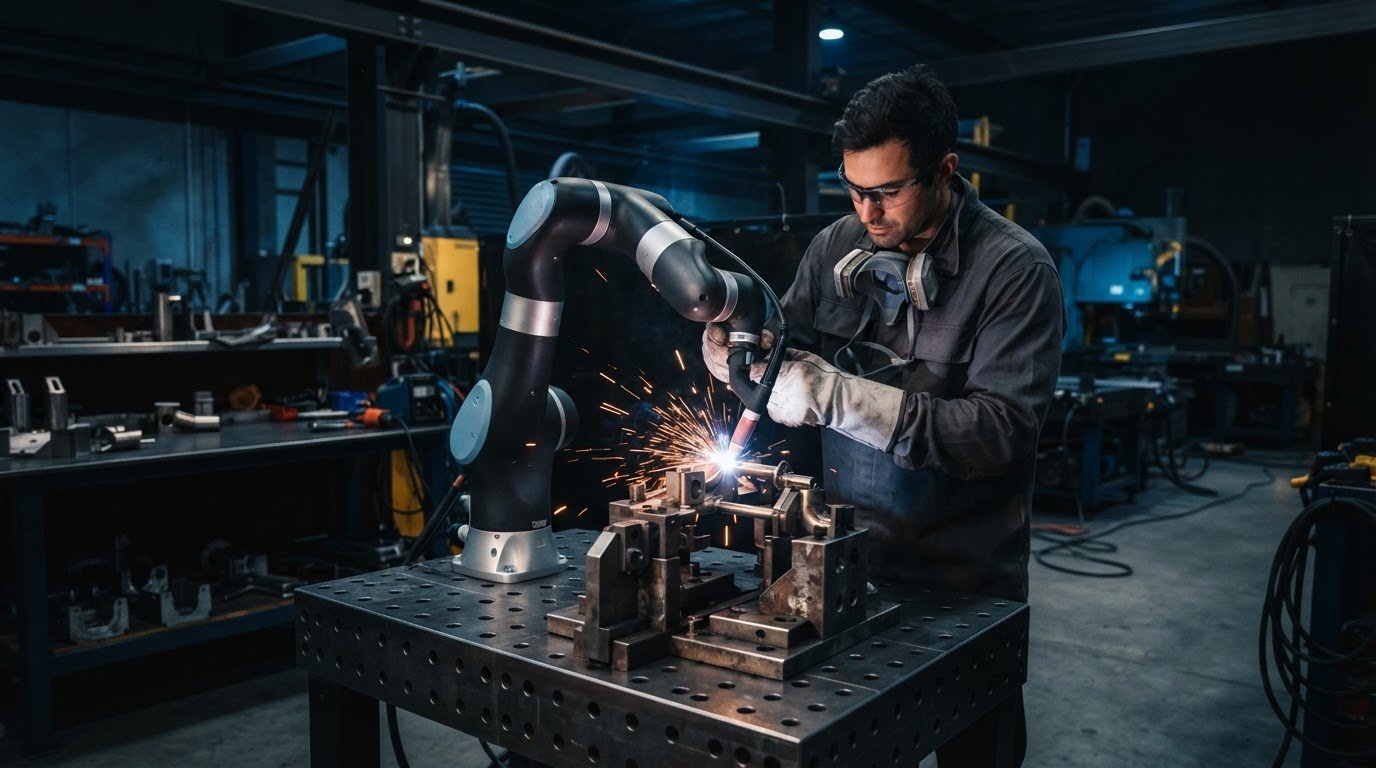
Frequent part changes don’t automatically rule out automation. Robotic welding for high-mix, low-volume production is designed to handle changing part geometries and smaller runs by making weld paths teachable and adjustments manageable on the shop floor. With a collaborative robot, an operator can teach a path, guide the weld sequence, inspect the results and refine the process.
The concern is real: if each new part means lengthy programming and disruptive changeovers, automation can be difficult to fit into a varied production schedule. The practical test is whether the work can be set up and retaught without adding more friction than it removes. This article explains how weld paths can adapt to part variation, what makes reteaching manageable, and which production conditions make robotic welding a sensible fit. It also covers the roles of fixtures, integration and operator training.
Key Takeaways
- Look for teaching tools that let operators create and adjust weld paths on the shop floor without relying on complex programming.
- Assess how part fit-up, joint access and sensing needs affect path consistency when components vary.
- Plan changeovers around repeatable locating points and straightforward reteaching to keep small batches practical.
- Start with part families that have repeatable joints, then assess how fixtures, integration and operator training can support broader use.
What is Robotic Welding Automation in High-Mix Manufacturing?
For varied production, automation combines teachable weld paths, repeatable parameters and a cell suited to changing jobs. Operators can adjust work on the shop floor using no-code teaching software, while integration with welding equipment and fixtures supports the complete process.
Teaching Weld Paths Without Programming Experience
An operator can guide a collaborative robot (cobot) along a joint, then refine its path through a simplified interface. For example, they can teach a short fillet weld, review the torch angle and adjust the start point. Cobot systems suit hands-on teaching and frequent changes; industrial robots can suit applications prioritising reach, payload or sustained production. Compare setup effort, access and the operator’s role.
Standardised Weld Programs and Parameters
A saved job stores a proven sequence and welding parameters for a particular material and joint. The operator selects the closest suitable job, then checks the fit-up, torch position and result on the actual part. This makes repeat work easier to reproduce and provides a consistent starting point when a part changes. Keep job names, fixtures and saved settings organised so operators can retrieve the right setup.
Welding-Cell Setup and Simplified Programming
Cell setup coordinates the robot, welding power source, fixtures, part handling, controls and sensing. A sound layout gives the torch access to each joint and lets operators load parts without obstructing the weld path.
Australian safety requirements depend on the cell’s design and workplace use. A site risk assessment should consider robot movement, welding hazards, guarding, access and operator training, then identify applicable standards and controls.
Integrator support should cover the cell’s equipment, programming and production workflow. Grant support depends on the relevant programme’s objectives, eligibility rules and project scope; match those criteria to the proposed automation project.
CAD-to-Weld Auto-Programming
CAD-to-Weld uses a part’s digital model to generate weld paths and related program data. The workflow can reduce repeated manual programming when moving between similar but distinct components, such as different beam configurations. Before production, check model accuracy, joint access, torch angles and path clearance against the physical setup. Offline programming can help test reach and validate paths in a computer-based environment before the cell is built.
Adapting weld paths to part variation
A flexible robot path needs to account for differences between the programmed joint and the part in the fixture. Touch sensing can locate a joint before welding, while seam tracking can adjust the torch path as it follows the seam. For example, if a component sits slightly out of position, sensing can help the robot follow the actual joint rather than repeat the nominal path unchanged.
These tools work best alongside sound part location. Repeatable datum points help fixtures hold components in a consistent position, giving the robot a dependable starting reference. A 3D model can also generate paths and parameters for repeatable work, but the physical fit-up still matters. Poor alignment or changing gaps can affect the weld, so operators should inspect trial parts and refine the setup.
Positioners help present joints at a workable angle. Rotating or tilting an assembly can improve torch access, reduce manual repositioning and maintain a suitable welding angle. This is useful for complex assemblies where one fixture position leaves joints awkward to reach. Check that the positioner’s movement fits the weld sequence and that the part stays secure throughout the operation.
AI-driven quality tools can analyse weld data or inspection results to flag patterns for review. They support, rather than replace, the operator’s judgement: a flagged change may prompt checks of fit-up, torch position or process settings. Treat feedback as a way to direct inspection, not as proof that every weld meets requirements.
Stable paths and settings make repeatability easier to assess across shifts. Inconsistent welds can add grinding and correction work, disrupt output and weaken confidence in delivery planning. Record recurring defects, then adjust the fixture, path or process and inspect the next weld. For a setup centred on operator-guided adjustments, explore collaborative robot welding as one approach to flexible production.
Changeovers and manageable robot reteaching
Frequent job changes make setup time part of the production decision. A practical changeover combines repeatable fixturing with a clear reteaching process, so welders can move between jobs without rebuilding every task.
Quick-Change Tooling and Fixtures
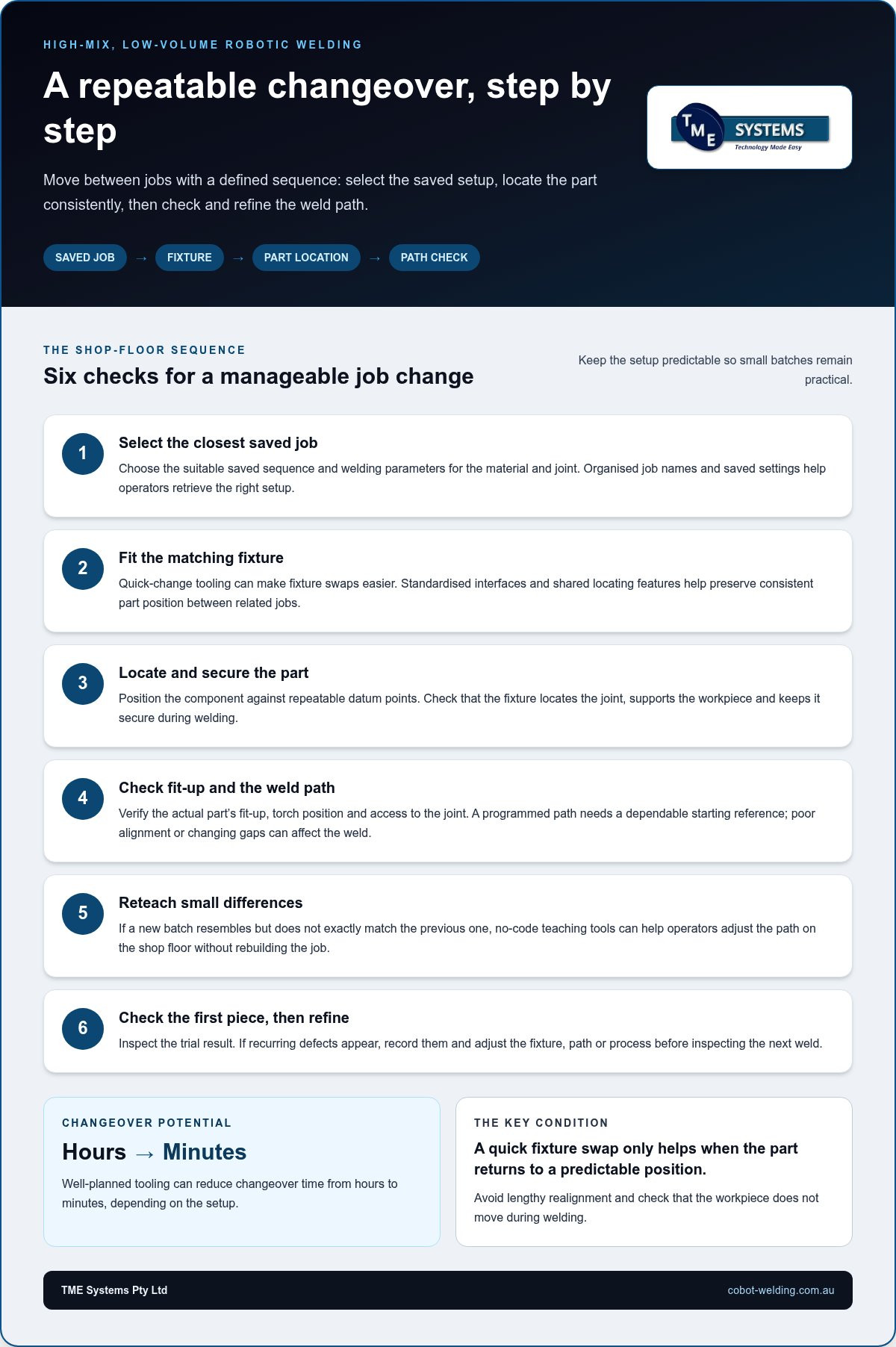
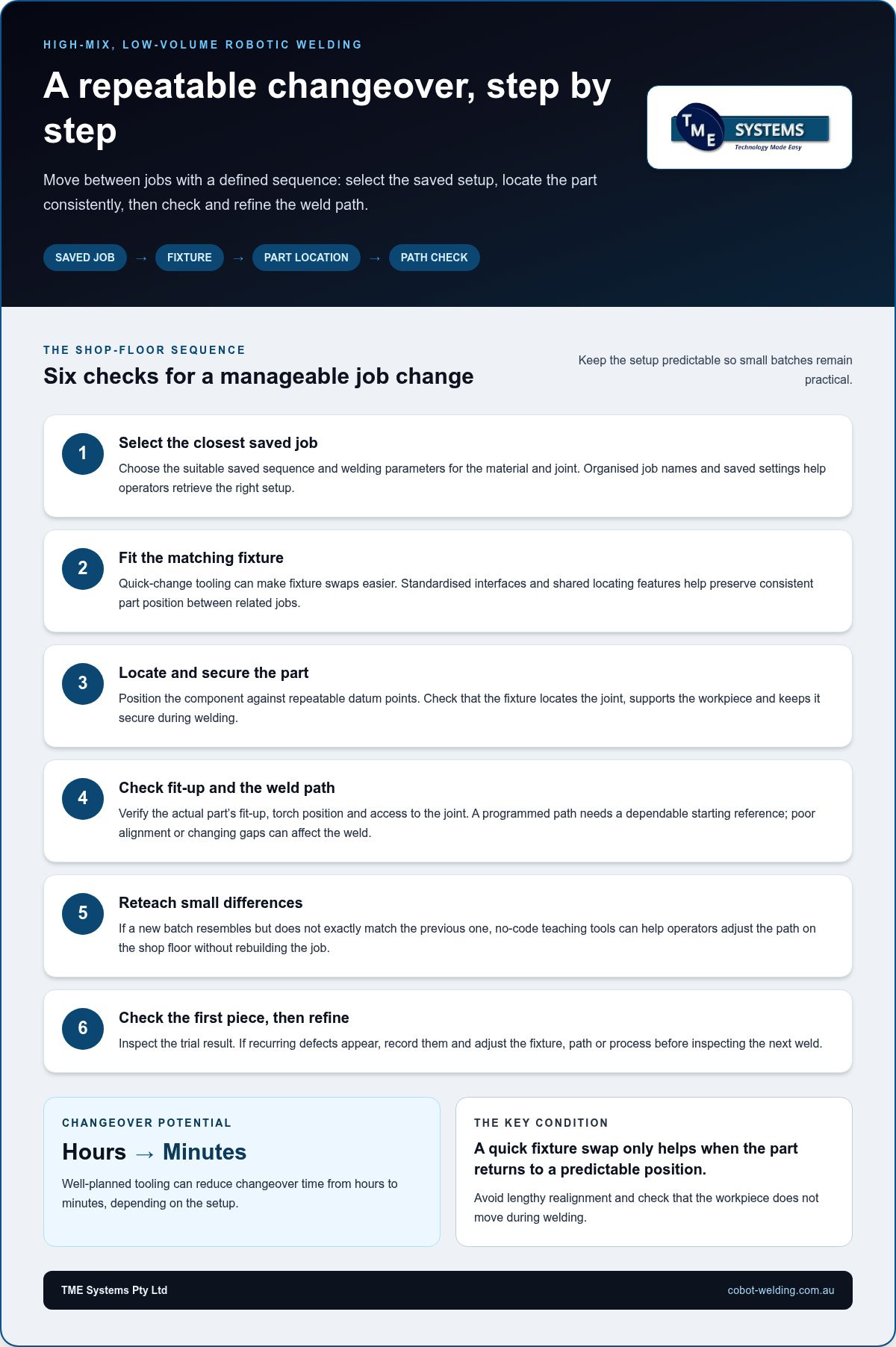
Quick-change tooling helps operators swap fixtures while preserving consistent part location. Standardised interfaces, repeatable datum points and less manual alignment make the next setup easier to position. For example, a fixture designed around a shared locating edge can support related brackets without measuring each part from scratch.
Review how each fixture locates the joint, supports the workpiece and connects to the cell. A quick swap won’t help if operators still need lengthy alignment or the part moves during welding. Well-planned tooling can reduce changeover time from hours to minutes, depending on the setup. The key is repeatability: the robot needs the part presented in a predictable position each time.
Quick Job Changeovers
A manageable job changeover gives operators a defined sequence. They can select the saved job, fit the matching fixture, locate the part against its datum points, then check the weld path. If a new batch differs slightly, no-code teaching tools can help adjust the path without rebuilding the job. This is especially useful when the new batch resembles, but doesn’t exactly match, the previous one.
Keep the first-piece check in the workflow. After loading the new part, the operator can inspect the joint, refine the taught path and review the test weld before the batch proceeds. This keeps human judgement in the loop while making repeat tasks easier to reproduce. Clear job names and saved settings also help welders retrieve the correct setup for each part family, rather than starting from memory.
Track where time is spent: fixture exchange, alignment, reteaching or first-piece inspection. That breakdown shows whether the bottleneck sits in tooling or teaching, and helps teams target the next improvement.
Robotic welding for high-mix, low-volume production
High-mix production can suit welding automation when a cell handles repeatable joints across changing parts. The key is balancing useful arc time against fixture changes, programming and inspection.
Production Volumes and Payback
There’s no universal batch size or payback period that makes a robot worthwhile. Assess how often each part family runs, how stable its fit-up is, and how much welding time and rework the process currently absorbs. Part families with repeat welds and enough recurring work to justify teaching are practical candidates.
Compare the full production task, not just the robot’s welding time. Include fixture changes, operator loading, setup, consumables and correction work. A controlled process can make completion times clearer, supporting labour planning, costing and delivery commitments. Payback depends on how often saved production time and reduced rework offset the cell’s implementation and operating demands.
Limitations and Risks in High-Mix Production
Frequent part changes can erode productive time if every job needs extensive teaching or manual alignment. Poor fit-up, inconsistent joint locations and awkward access can also reduce repeatability. Map the part family, joint types and fixture requirements before selecting a cell. Each part still needs a suitable setup and process validation, even when related parts can share a cobot.
Welding systems rely on coordinated fixtures, part handling, power sources, teaching and sensing. A gap in any part of that chain can create delays or inconsistent welds. For example, a poorly located component can undermine an accurately taught path. Operators need time to learn the job sequence and spot defects, while the cell needs a clear plan for inspection and process adjustments.
Start with a representative part family, then record setup time, weld time, consumable use and rework. Use those results to decide whether to expand the mix or refine the process first. Assess a collaborative robot welding cell against your parts, changeovers and production workflow.
TME Systems: No-Code Teaching Software
TME Systems offers No-Code Teaching Software for manufacturers who want operators to teach and adjust robot weld paths without conventional programming. No coding experience is needed. It’s a practical option when frequent job changes make programming effort a concern, but the production mix still includes repeatable weld tasks.
TME Systems’ Mobile Demo System brings a welding cell to your site to help assess whether a part family suits robotic welding or needs more process work. For implementation, Welding Automation Integration and Operator Training and Onboarding support cell setup and the people who will use it. These services connect the teaching approach with production requirements and operator capability.
Contact TME Systems to discuss your parts, changeovers and welding workflow.
Take the Next Step with Your Production Mix
The next step is to choose a representative part family and map what the cell must handle: joint access, fixture changes, path teaching and operator involvement. That practical assessment can turn interest in robotic welding for high-mix, low-volume production into a clear production decision grounded in your parts and workflow.
TME Systems offers No-Code Teaching Software, Collaborative Robot Welding and a Mobile Demo System to support that evaluation. Consider how operators would teach a job, how the cell would fit your existing welding equipment and fixtures, and what your team needs to run it confidently. These details help shape a useful discussion around the production challenge, rather than starting with technology alone.
Contact TME Systems to discuss robotic welding for your production requirements. A practical first step can help your team assess where automation fits and how to move forward with confidence.
Frequently Asked Questions
How does robotic welding work for high-mix, low-volume manufacturing?
For robotic welding in high-mix, low-volume production, operators pair a robot with fixtures, a welding power source and teachable job routines. They load a secured part, select its job and run the weld sequence. A practical workflow also defines who checks the first finished piece, how defects are recorded, and when a stored path needs adjustment before the next batch.
Which robotic welding systems are best for high-mix, low-volume production?
A collaborative robot welding cell can suit production that needs operator-led teaching and regular job changes. Match the robot’s reach and movement to the parts, then consider the welding process, torch package and power source together. MIG and TIG are supported when the robot, power source, torch package and process requirements are matched correctly. Site risk assessment and operator training also inform the system design.
What fixtures, tooling and programming methods enable fast changeovers between jobs?
Choose fixtures that locate related parts from shared reference points, with interfaces that let operators remove and refit tooling consistently. Keep each job’s name, fixture match and weld sequence together in an organised program library. For a bracket family, for example, the operator can select the appropriate saved job and fixture, then confirm the part is seated correctly before welding.
How can offline programming and adaptive welding handle frequent part variations?
Offline programming lets a programmer build and review a robot job in a computer-based environment before using it on the shop floor. It can help identify reach or torch-angle issues in a changed part design. During production, touch sensing or seam tracking can help the robot respond to joint position differences. Operators still need to assess fit-up and verify weld results.
What safety standards and compliance requirements apply to robotic welding in Australia?
Australian safety requirements depend on the cell’s design and workplace use. Assess robot movement, welding hazards, guarding, access and operator training, then identify the applicable standards and controls.