
High uptime doesn’t automatically mean strong production output. Tracking uptime for automated welding gives you a clearer picture when you measure system availability alongside arc-on time, weld quality and defect rates, then compare those measures with finished production. That distinction matters: a cell can be running but still lose output to slow cycles, rework or inconsistent welds.
It’s understandable to focus on whether a welding cell is available. But useful tracking also shows when interruptions happen, what causes them and how they affect output. Without consistent definitions and reliable event records, uptime figures can be difficult to act on.
This article explains how to plan dependable uptime tracking, connect availability data with production results, and balance precision with uptime when assessing a system. It also covers sensors, software and downtime logs that can make performance easier to understand, so you can focus on practical improvements rather than a headline percentage.
Key Takeaways
- Set clear rules for what counts as available, stopped or producing so uptime figures are consistent and useful.
- Pair availability data with arc-on time, weld quality and completed output to see whether the cell is meeting production needs.
- Choose monitoring tools around the faults and process changes you need to detect, not just the amount of data they collect.
- Log downtime causes in a consistent way to uncover recurring issues and guide practical corrective action.
Implementation planning and data quality
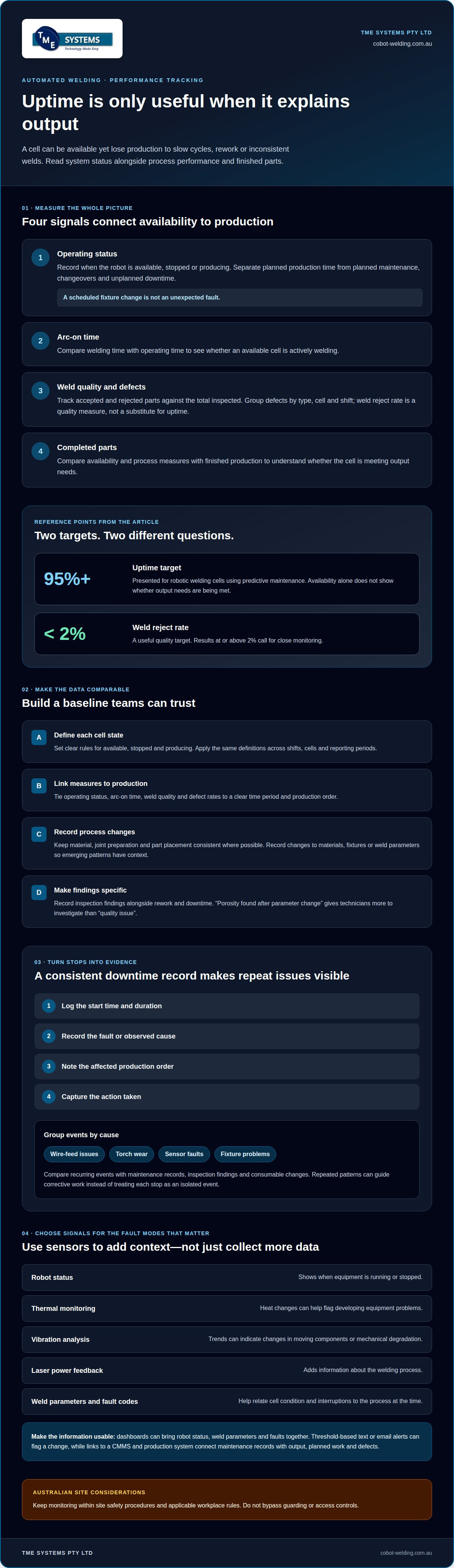
Start by defining what “available” means for each robotic welding cell. Record planned production time separately from planned maintenance, changeovers and unplanned downtime. For example, a scheduled fixture change shouldn’t be counted as an unexpected fault. Apply the same definitions across shifts, cells and reporting periods. Otherwise, two teams may report different uptime figures for identical production conditions.
Next, establish a baseline using operating status, arc-on time, weld quality and defect rates. Link each measure to a clear time period and production order. Continuous monitoring can reveal whether a cell is available but producing inconsistent welds. Dashboards showing robot status, weld parameters and faults help technicians relate an interruption to the process conditions at the time.
Use weld reject rate as a quality measure, not a substitute for uptime. A rate below 2% is a useful target for robotic welding cells, while results at or above 2% call for close monitoring. Track accepted and rejected parts against the total inspected, then group defects by type, cell and shift. This shows whether a recurring issue needs attention.
Part quality affects the reliability of this analysis. Inconsistent material, joint preparation or part placement can cause weld variation that looks like a robot fault. Keep these factors consistent across production runs, and record changes to materials, fixtures or weld parameters. For example, an increase in rejects after a fixture adjustment gives technicians a specific point to investigate.
Record inspection findings alongside rework and downtime events. Imperfect welds can lead to rework, product failures or safety risks, so a note such as “porosity found after parameter change” is more useful than “quality issue”. Compare recurring findings with maintenance records and consumable changes. This evidence helps teams identify patterns, plan corrective work and focus monitoring on faults that affect production.
System uptime and production throughput
Availability matters most when it helps explain production output, not just machine status. Compare operating time with arc-on time, completed parts and downtime causes.
Uptime tracking methods
Uptime tracking records when welding robots are available, stopped or producing. Manual downtime logs rely on operators recording events, while automated systems capture equipment states more consistently and can link them with production records. A target of 95%+ uptime is presented for robotic welding cells using predictive maintenance, but availability alone won’t show whether the cell meets output needs. In Australia, keep monitoring within site safety procedures and applicable workplace rules, without bypassing guarding or access controls. Monitoring and OEE software costs depend on sensor numbers, integration scope, software licensing and support; pricing depends on the case and is provided after a quote request.
Sensors and monitoring software
Monitoring combines machine signals and software to show cell status, process changes and developing equipment problems. IoT sensors, thermal monitoring, vibration analysis and laser power feedback can help detect failures or component degradation. Dashboards can bring robot status, weld parameters and faults together, while alerts can flag threshold changes. Linking this information with a CMMS and production system helps connect maintenance records to output, planned work and defects. Environmental factors matter too: fume extraction and airflow management help limit contamination, while temperature and humidity control support process consistency. For a system built around collaborative automation, collaborative robot welding cells are one option to consider.
Downtime analysis and maintenance
Downtime analysis turns recorded stops into evidence for corrective action. Log the start time, duration, fault or observed cause, affected production order and action taken. Then group events by cause, such as wire-feed issues, torch wear, sensor faults or fixture problems. This helps technicians spot recurring failures instead of treating each stop as an isolated event. Preventive maintenance can reduce unexpected interruptions by addressing wear before it affects production. Follow the robot manufacturer’s maintenance schedule, record completed work, and connect inspection findings with repeat faults. Predictive maintenance uses condition data, such as rising vibration or temperature, to help identify component degradation before a breakdown.
What sensors and software can track automated welding cell uptime?
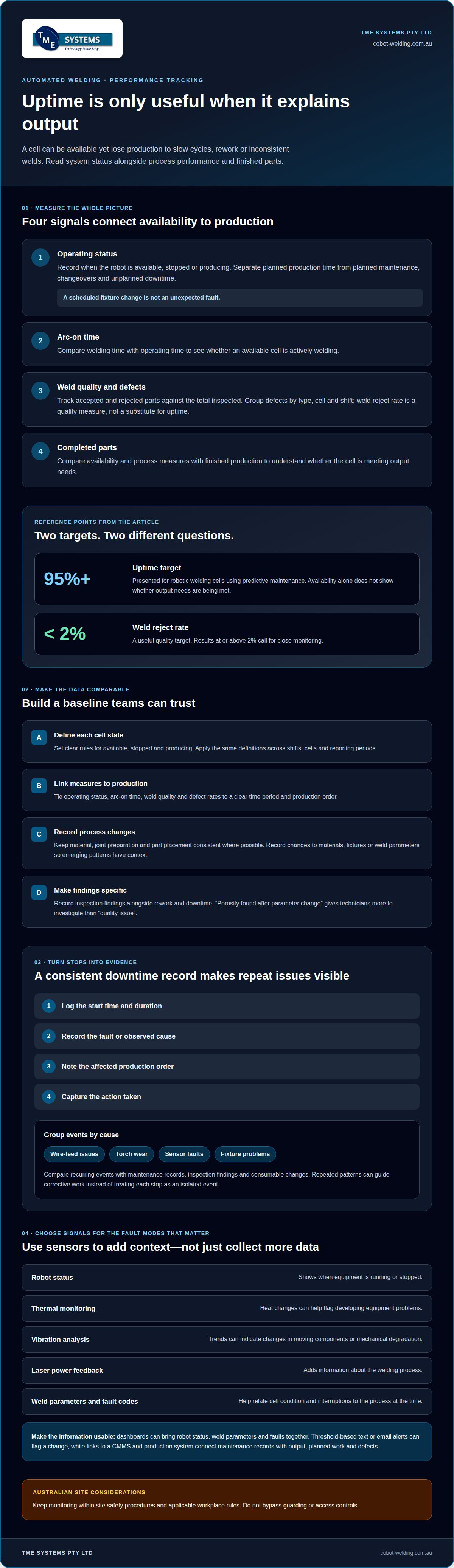
A welding cell can combine machine signals with sensors that reveal developing faults. IoT sensors, thermal monitoring, vibration analysis and laser power feedback each show different conditions. Robot status indicates whether equipment is running or stopped. Thermal readings can flag changes in heat, while vibration data can reveal changes in moving components. Laser power feedback adds information about the welding process. Together, these signals give technicians more context than a single running-state indicator.
Choose signals based on the failure modes that matter in your cell. For example, a temperature change alongside a fault code can help distinguish a process interruption from a developing equipment issue. A vibration trend may point to mechanical degradation, while a robot status signal records when production stopped. Use weld parameters alongside these readings to relate equipment condition to the work in progress. The aim is useful evidence, not simply more sensor data.
Monitoring software brings these inputs into a readable view. A dashboard can display robot status, weld parameters and faults, while automatic text or email alerts can notify staff when a threshold is exceeded. Set thresholds to match a specific signal and response. For instance, an alert for a fault state can prompt an operator to record the event and follow the cell’s troubleshooting procedure. Clear labels help operators interpret information without deciphering raw sensor output.
Data becomes more useful when monitoring connects with existing controls and production records. SCADA and PLC integration typically takes 2-5 days, allowing machine signals to feed into a wider view of cell activity. Confirm that timestamps and status definitions align across systems, so a fault and its production impact appear in the right sequence. A practical setup lets operators see current cell conditions, while technicians can review trends, recurring alarms and process changes over time. That makes sensor and software choices easier to judge against actual production needs.
How can downtime causes be logged and analysed in a welding cell?
A useful downtime record connects each stop with its cause and production impact. Capture the cell identifier, start and end times, fault code, affected job, operator observation and action taken. For example, “wire-feed fault, feed path inspected, production resumed” gives technicians more to investigate than “robot stopped”. Consistent records make tracking uptime for automated welding more useful by connecting interruptions with specific production events.
Use a shared list of cause categories, such as robot fault, wire-feed problem, torch or consumable issue, fixture interference, material variation and planned changeover. Keep an “unknown” category for events that need investigation, rather than guessing the cause. If a fault code and operator note differ, retain both. The difference can help technicians investigate whether the alarm reflects what happened on the floor.
Start analysis by grouping events by cause, cell, job and shift. Look for repeated stops and compare them with inspection findings, maintenance records and weld defects. For instance, recurring wire-feed interruptions alongside poor weld results may point to a process issue worth investigating. A pattern doesn’t prove the cause, but it gives the next inspection a practical starting point.
Close the loop by recording the corrective action and its outcome. If technicians adjust a fixture, note whether the same stoppage returns in later production. If an inspection finds torch wear, connect that finding with subsequent weld quality and downtime records. For tracking uptime for automated welding, follow-up notes help distinguish a one-off interruption from a recurring condition and refine maintenance planning around actual cell behaviour.
Keep reviews focused: identify recurring causes, assign corrective actions, then compare later records. Inspection findings can help track repeat issues and identify potential failures before defective parts are produced. Consistent logs also give operators and technicians a shared account for shift handovers, reducing reliance on memory. Discuss a welding cell data approach to connect monitoring with production needs.
TME Systems
TME Systems helps manufacturers connect collaborative welding automation with practical production needs. If you’re assessing how a welding cell fits your workflow, TME Systems can discuss integration with your equipment and process. No-Code Teaching Software lets operators teach weld paths without writing code, while the Mobile Demo System brings a welding cell to your site for a demonstration.
Consider this support when planning a first cell, refining an existing welding process or deciding how operators will work with automation. The right approach depends on the parts, weld requirements and production environment. Reviewing these factors can help shape an approach that suits the work and the people doing it.
Contact TME Systems to discuss your automated welding requirements.
Make your next automation decision with a clear purpose
A practical approach to tracking uptime for automated welding starts with the production decision the data needs to support. Are you assessing a new cell, refining an existing process or preparing operators for a change? Keeping that purpose in view helps make performance information useful for day-to-day planning.
As your requirements take shape, consider how the system should fit the parts being welded and the people working with it. A useful next step is to discuss the production task, operator workflow and outcomes that matter to your operation. Contact TME Systems to explore how no-code teaching and a mobile demonstration could fit your workshop, while keeping skilled judgement central to the process.
Bring your questions and project priorities to TME Systems. Discuss your project with TME Systems and explore a practical next step for your production line.
Frequently Asked Questions
What does uptime mean for an automated welding system?
Uptime is the share of planned production time when a welding system is available to run. The definition should distinguish a machine that is powered on from one ready to produce conforming parts. For example, a cell awaiting a weld-quality adjustment may be technically running but not meeting production requirements. Agreeing on this distinction makes reported availability more meaningful to production and maintenance teams.
How do you calculate uptime and availability for robotic welding equipment?
Divide the time equipment was available by its planned production time, then multiply by 100 to express availability as a percentage. Use the same rules for planned production time and excluded periods across every shift. For example, decide consistently whether planned changeovers count against availability. This gives managers a repeatable measure for comparing cells and periods, rather than figures shaped by different assumptions.
Which KPIs should be monitored for automated welding uptime?
Pair availability with arc-on time, completed output, weld quality, reject rate, downtime duration and repair time. Each measure adds context: arc-on time shows how much production time involved welding, while rejects can reveal a quality problem hidden by a strong availability figure. Review the measures together for each cell and production run. This helps distinguish a machine-state issue from poor throughput or inconsistent results.
What are typical uptime benchmarks for automated welding systems?
There isn’t one benchmark that suits every production line, as part mix, shift patterns and planned stops affect the result. A 95%+ uptime target is presented for robotic welding cells using predictive maintenance, and at least 85% arc-on time is recommended. Treat these as reference targets, not guarantees. Compare results with your production requirements and track weld quality alongside availability.