
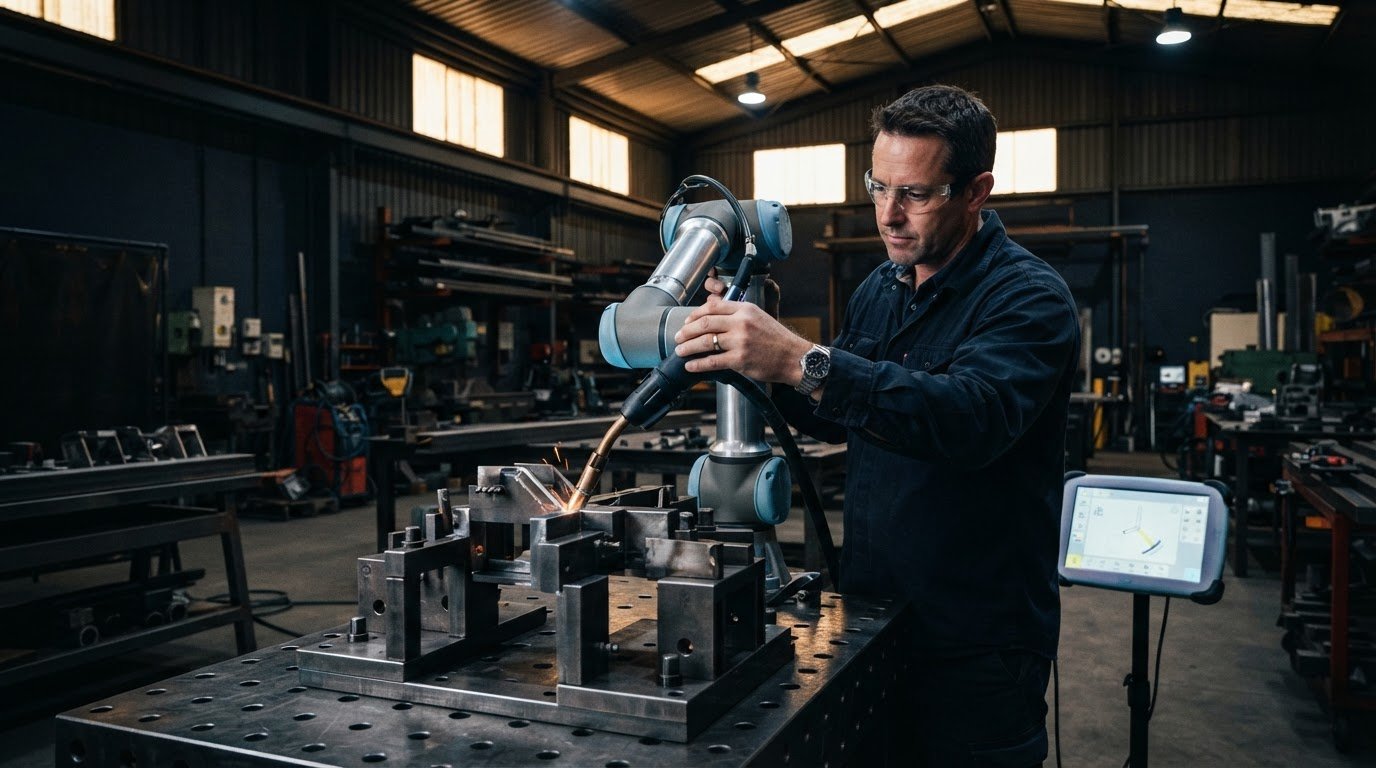
Manual guided programming lets an operator move a collaborative robot along the weld path and set the welding parameters through a simple interface, without writing code. In the hands-on approach described for welding automation for non-programmers, most welds can be programmed in less than 20 minutes, even without prior robotic experience.
It’s reasonable to expect setup to involve more than showing a robot where to weld. Part position, joint access and fixture repeatability all affect how smoothly the process works. Changes between parts may also require adjustments to the path or settings.
This guide explains how manual guided programming works and what happens during setup, from positioning a part and teaching its weld path to refining the process. You’ll also see how fixtures, collaborative robots and adaptive capabilities can support the move to automated welding, and why the best starting point is often a straightforward job with consistent access.
Key Takeaways
- Manual guided teaching lets an operator show the robot a weld path and adjust settings through an accessible interface, rather than write code.
- Assess part repeatability, joint access and production needs to see whether a collaborative welding cell could suit your work.
- Start with a straightforward weld and a stable fixture; consistent positioning makes setup and repeat runs easier to manage.
- Adaptive capabilities can help address variation in parts, while system design determines how well the robot can reach each joint.
Collaborative welding robots
Collaborative welding robots can make robotic welding more accessible by letting operators teach weld paths without traditional coding. Setup still depends on the part, fixture, weld access and safeguards required for the workcell.
Robot programming approaches
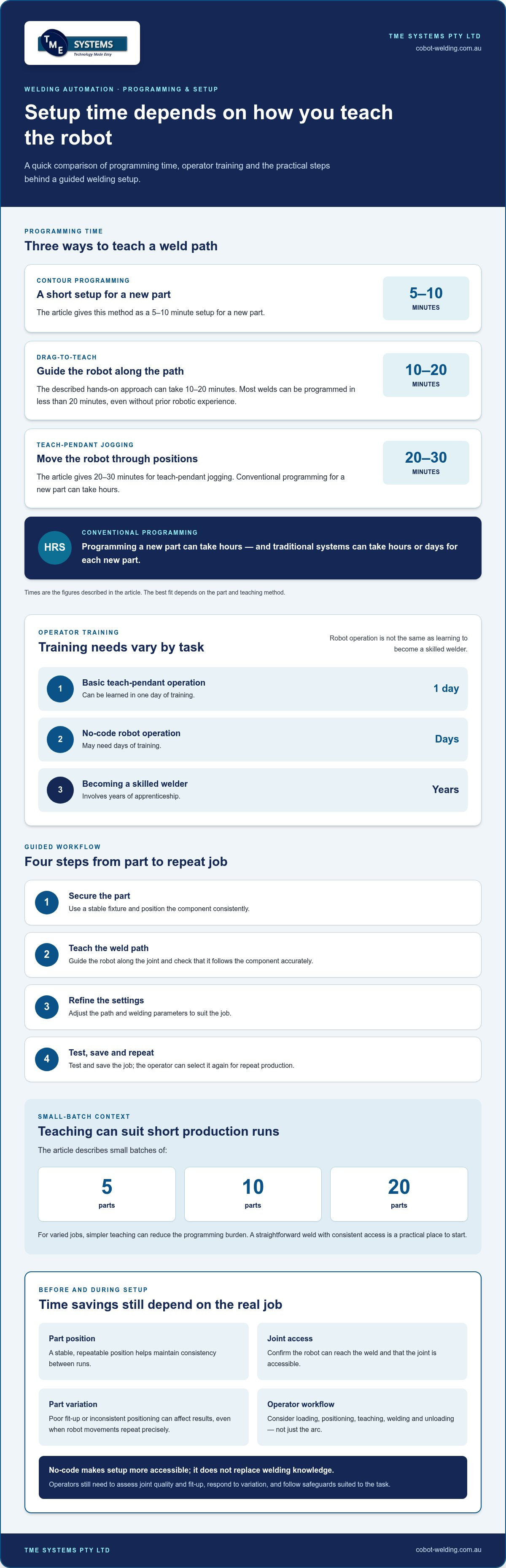
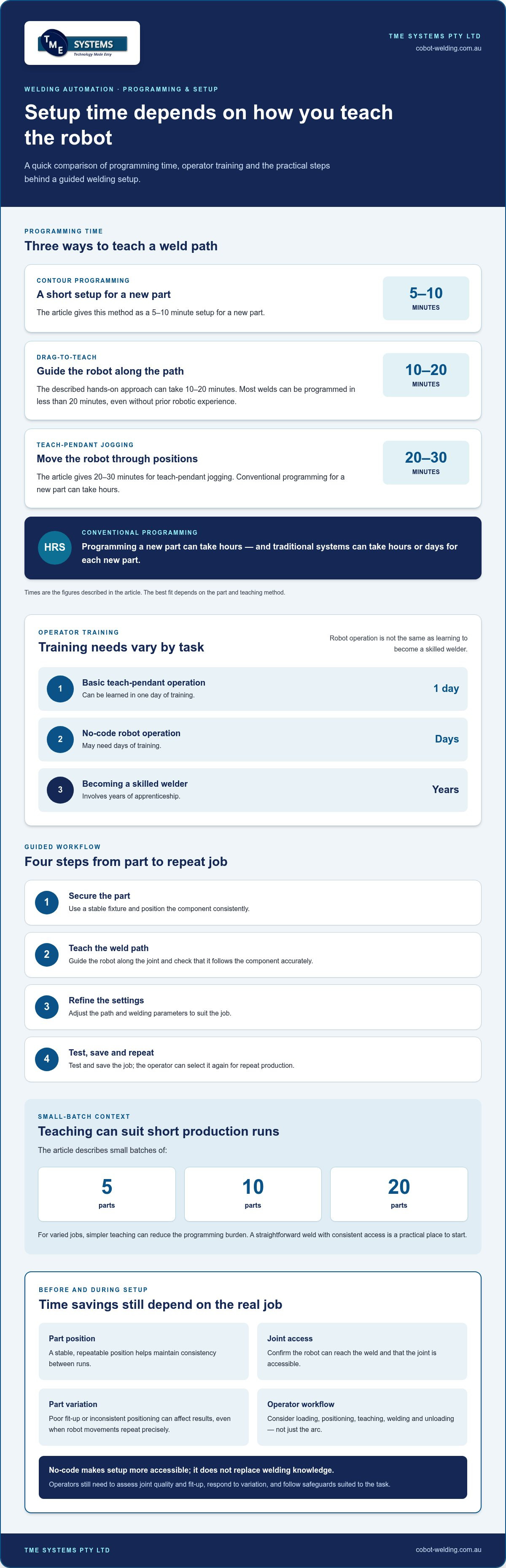
Robot programming ranges from moving a robot manually with a pendant to teaching paths by hand, building programs offline or generating them autonomously. The approach matters because conventional programming can take hours for a new part and may rely on identical parts, while drag-to-teach setup can take 10-20 minutes.
Manual pendant programming requires the operator to jog the robot through its positions. Assisted teaching lets an operator guide the arm along the weld path. Offline programming uses a digital model, but the program may need adjustment when the real part differs. Autonomous systems can use 3D drawing information to generate weld paths and sequences. For small batches, including runs of 5, 10 or 20 parts, simpler teaching can reduce the programming burden.
Collaborative programming software
No-code teaching software provides an interface for teaching paths, adjusting welding parameters and organising jobs without writing code. Operators can make practical adjustments at the cell rather than relying on a specialist for every change. No coding experience is needed to use TME Systems’ software.
A typical guided workflow is to secure the part, teach the robot the weld path, refine the settings, then test and save the job. The operator can select the saved job for repeat production. Software can make setup more accessible, but it cannot correct poor fit-up or inconsistent part positioning. A stable fixture and clear joint access still matter.
Safety, risks and workplace requirements
For Australian workplaces, automated welding must be considered within applicable workplace safety duties and robot safety requirements. ISO 10218-2:2025 is a reference for industrial robot safety; collaborative applications still require a safety assessment based on production factors.
Key risks include robot movement, welding hazards and unexpected variation in parts. Assess the full task, set suitable safeguards and train operators to load parts, select jobs and respond to faults. A collaborative robot is not automatically safe to approach during every operation. The layout and robot movements determine the safeguards needed, based on the application, tooling, process and site risk assessment.
Is it hard to make the switch to automated welding?
For an Australian small business, choose a system around a representative part, weld quality requirements and production pattern. Trial the setup on that part, then assess access, repeatability and operator workflow before deciding whether to proceed.
Workforce shortages and automation barriers
Automation can help skilled welders focus on work that needs their judgement, but it doesn’t remove the need for welding knowledge. Traditional systems can take hours or days of programming for each new part, creating a barrier for shops with varied jobs and small batches.
That programming effort can be difficult to justify when jobs change often. A manufacturer producing different models in short runs may spend too much setup time before welding begins. Guided teaching can reduce reliance on specialist programming, while a welder’s skill remains important for assessing joint quality and fit-up.
Operator training for automated welding
Operator training prepares workers to load parts, select a job, teach or adjust a path, and recognise when a weld needs attention. A robot follows its instructions, while the operator still needs to respond to variation in real production.
Basic teach-pendant operation can be learned in one day of training, while a no-code robot operator may need days of training. That is different from the years of apprenticeship involved in becoming a skilled welder. Training should match the operator’s tasks, including safe operation, setup and how to respond when a part doesn’t sit as expected.
Choosing and trialling a system
For a useful trial, bring a representative part and define what success means before the test. Consider joint access, fixture repeatability, weld quality, changeover effort and how the operator will load parts and select jobs. A straightforward, consistent weld is a practical starting point, while complex parts can introduce several variables at once.
Watch the full cycle, not just the arc: loading, positioning, teaching, welding and unloading. Note where the operator must intervene and whether the fixture holds the part consistently. A hands-on welding automation trial can help a small business assess these details using its own production needs.
Programming and setup without specialist expertise
Welding automation for non-programmers lets an operator teach a robot the weld path and adjust settings through an accessible interface, rather than writing code. The operator positions a component, guides the robot along the joint, then saves the taught process for production. This makes practical welding knowledge central to setup.
A useful starting point is a short, linear weld with consistent joint access. The operator can focus on the robot’s position and the joint, then check whether the programmed path follows the component accurately. Contour programming can take 5-10 minutes to set up a new part, while teach-pendant jogging can take 20-30 minutes. The best fit depends on the part and teaching method.
Setup involves more than teaching a line. Secure the component in a repeatable position, confirm the robot can reach the weld, and refine the path and welding parameters. Poor fit between parts can affect results, even when the robot repeats its movements precisely. Stable positioning helps maintain consistency across production runs.
For manufacturing with varied models, the setup process should make changing jobs manageable. An operator can save a job for a component, then select it for a later run. If the part or fixture changes, the path may need adjustment. In short runs, setup time matters because the effort is spread across fewer completed parts.
Traditional robotic systems may require specialist programming, and programs based on digital models can need correction when the physical component differs. Guided teaching offers another route: the operator demonstrates the weld path at the robot, then tests and refines it on the actual part. This brings the real fixture and joint access into setup.
Keep the first process straightforward. Choose a component with clear access, consistent fit-up and a weld path that is easy to teach. Once the operator can teach, save and repeat the job, the same approach can be assessed for other parts and production volumes.
System design, fixtures and adaptive capabilities
Robot access, part restraint and operator workflow shape an automated welding cell. Start by mapping each joint on the component, then check whether the torch can reach it without awkward repositioning. For structural beams, a positioner that allows 360 degrees of rotation can expose joints around the workpiece. The layout should suit the weld sequence, not just the robot’s reach.
Fixtures hold components in a repeatable position, reducing variation between taught paths and production parts. Start with a fixture that locates the part securely and leaves clear access to the joints. Complex clamping can obstruct the torch or add setup steps. The practical test is whether an operator can load the part consistently while keeping the weld area accessible.
Adaptive features address variation that a fixed program can’t resolve by itself. Some autonomous welding systems use 3D cameras to identify T-joints, lap joints and other geometries. A robot can also compare a beam’s joint position and thickness with a digital file, adjust its program, then weld. These capabilities matter when parts vary from the expected model.
Software and interface design affect how operators teach or refine a process. An intuitive interface can make path changes easier to understand, while the fixture determines where the component sits. Programs based on digital models may need touch-ups if the model differs from the real, fixtured part. Manual welding remains useful for jobs that don’t suit a repeatable automated process.
Design also includes how information moves through production. Overhead laser layout projections can be generated from 3D models, carrying the digital thread into shop routing. This can help align preparation and assembly with the welding cell’s intended setup. The key takeaway is to design around the part, its fixture and the operator’s workflow together.
Explore a welding cell configuration that fits your parts, fixtures and production workflow.
TME Systems: No-Code Teaching Software
TME Systems’ No-Code Teaching Software lets operators teach robot weld paths and adjust welding parameters without traditional programming. It’s a practical option when workshop operators need to manage job setup without writing code for every change.
Collaborative Robot Welding brings the robot and operator-led teaching approach together, while Welding Automation Integration aligns the cell with your production process and existing equipment. The Mobile Demo System brings a welding cell to your site so you can evaluate the approach with your parts and workflow.
If you’re assessing no-code welding automation for your workshop, contact TME Systems to discuss your requirements.
Plan a practical first step
Choose a production job that reflects the work you want to improve, then note the part, weld access, fit-up and operator tasks involved. This gives your team a concrete basis for discussing equipment and setup, rather than starting with technology in isolation. For welding automation for non-programmers, the key is matching the teaching approach to the work your operators actually do.
TME Systems offers No-Code Teaching Software, Collaborative Robot Welding and a Mobile Demo System. Considering these together can help you assess how an operator will teach a weld and how the cell could fit your workflow. Bring your production requirements into the discussion, including the parts and processes you want to evaluate.
Contact TME Systems to discuss your needs and explore a practical next step for your workshop. A considered start can make automation easier to assess and your team’s experience an active part of the process.
Frequently Asked Questions
How does manual guided programming work?
An operator guides the robot along a weld seam while the software records the taught path. Secure a representative part, guide the torch along the intended seam, then refine the settings and test the process. This helps the operator assess access and weld quality before saving the job for repeat use. No coding experience is needed to use TME Systems’ software.
When Is No-Code Robotic Welding a Good Choice?
No-code robotic welding suits parts with repeatable fit-up, clear torch access and enough repeat work to make teaching worthwhile. It can also suit high-mix, low-volume production when similar part families share fixtures or weld strategies. For example, if several frame models have comparable joints, shared setup knowledge may make changeovers more practical than programming each job from scratch.
What skills or training are needed to use automated welding without programming experience?
Robot programming experience isn’t required, but operators need training for the tasks they’ll perform. This can include loading and locating parts, choosing the right job, teaching or refining paths, and recognising when a component or weld needs attention. Welding knowledge remains valuable for judging the joint and finished weld. Training should also cover safe interaction with the cell and its controls.
How do teach-pendant, hand-guided, and no-code welding automation compare?
A teach pendant lets an operator jog the robot using its controller and record positions along the weld path. Hand-guided teaching uses physical movement of the robot to demonstrate that path. No-code software gives operators an interface for teaching and adjusting jobs without writing code. The practical difference is how the path is entered and which method suits the operator and production task.
Can welding automation handle different parts, weld paths, and small production runs?
Yes, provided the parts and setup suit the system. No-code teaching can make changes more practical across related part families, particularly when fixtures and weld strategies can be reused. Some systems use 3D cameras to identify joint shapes, while offline programs may need touch-ups if the physical part differs from its model. Part variation and joint access affect repeatability.
What equipment and workshop requirements are needed for automated welding?
A setup needs a robot cell, compatible welding equipment, a torch package and fixtures that hold parts consistently. MIG and TIG are supported when the robot, power source, torch package and process requirements are matched correctly. Workshop planning should also consider part loading, torch access and operator workflow. A site-specific risk assessment helps determine safeguards for the application and layout.