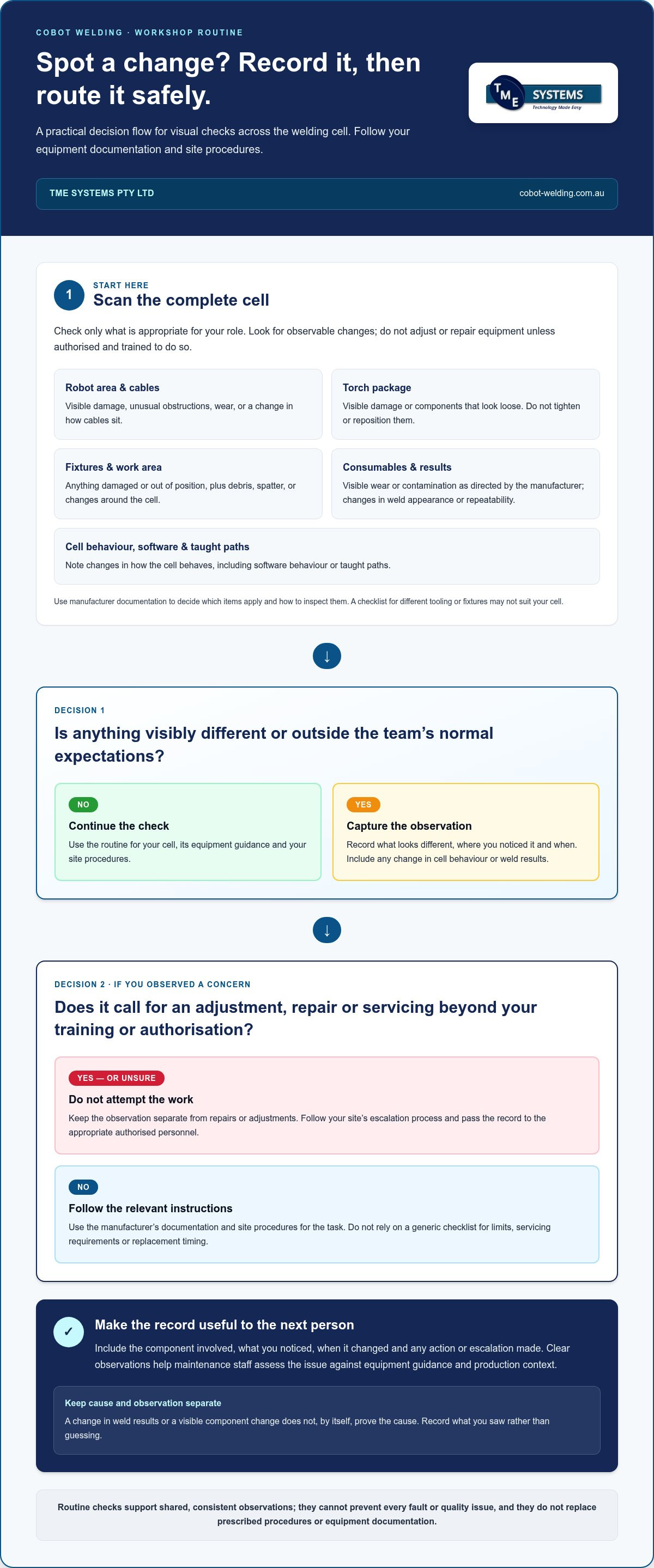

What if a routine check spots a worn torch consumable before it affects weld consistency or interrupts a run? A cobot welding maintenance checklist helps your team notice changes early, record useful details and escalate issues to the right person.
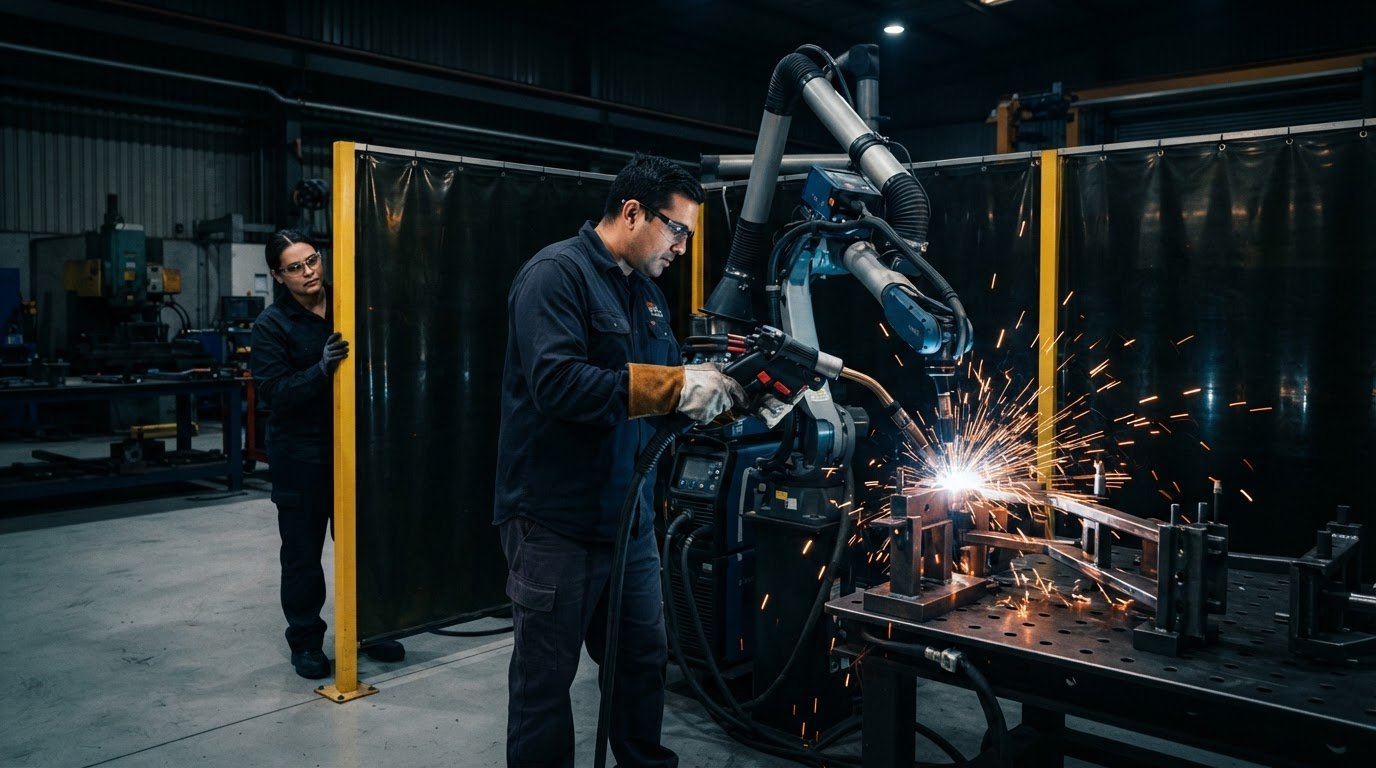
In a welding cell, the robot works alongside a torch package, welding equipment, power source and fixtures. Checks that suit one setup may not suit another, so build your routine around the equipment in your cell, its documentation and the way your team uses it.
This article explains how to organise observable checks, maintenance records and escalation points. Operators, production staff and technical support can share responsibility without asking operators to work beyond their training. TME Systems’ No-Code Teaching Software is designed for welders and operators, and no coding experience is needed. With clear onboarding, your team can learn both the teaching workflow and the routine for recording and escalating observations.
Key Takeaways
- Build your cobot welding maintenance checklist around the complete cell, including the robot, torch package, welding equipment and fixtures.
- Use visual checks to notice changes in components and the work area, then follow site procedures for anything that needs attention.
- Set check timing and tasks using equipment guidance, how the cell is used and what your team records, rather than relying on a one-size-fits-all schedule.
- Make each check actionable: observe, record, assess and escalate, including changes in software behaviour or taught paths.
- Use operator onboarding to clarify responsibilities and escalation, so checks fit the way your team works with the integrated cell.
Why a cobot welding maintenance checklist should start with your actual cell
A checklist copied from another workshop can overlook the parts that matter in your cell. A cobot welding setup is a connected production system, not just a robot arm. The torch package, wire-feed equipment, welding power source, fixtures and software all contribute to how the work runs. Start by listing what is installed, how each part is used and which equipment instructions apply.
A cobot welding maintenance checklist is a repeatable record of what the team observes, checks and does across the complete welding cell. It gives operators and maintenance staff a shared reference. Consistent records make changes easier to identify and discuss, although routine checks cannot prevent every fault or quality issue.
If your team is new to collaborative robots, What is a Cobot? offers general background. For maintenance planning, begin with the specific cell, its equipment documentation and your site procedures.
What belongs in the checklist?
Cover the robot area, torch package, wire-feed equipment, power source, fixtures and the software used to teach or run the weld. The right checks depend on the cell configuration and welding process. For each component, note what the operator can observe, what instructions apply and who should receive a concern. A list made for different tooling or fixtures may not suit your setup.
Use each manufacturer’s documentation for task-specific instructions, limits and maintenance requirements. The checklist can prompt an operator to look for visible changes, but it does not replace prescribed procedures or authorise work beyond their training. Keep simple observations separate from adjustments, repairs or servicing that require authorised personnel under your site procedures.
How maintenance supports repeatable welding
Weld results can change for several reasons. Visible damage, a loose-looking component or a change in consumable condition may be relevant, but none of these observations alone proves the cause of a variation. The purpose of a routine is to capture useful information, not to encourage guesswork.
Ask operators to record what they noticed and when, along with any change in cell behaviour or weld results. For instance, if a weld looks different from the usual result, note any visible change in the torch package or consumables instead of assuming one of them caused it. Maintenance staff can assess the observation against equipment guidance and production context.
Keep the record practical enough to complete during a normal shift. A clear description, the component involved and the action taken or escalation made help the next person understand what changed. For a team using its first cell, onboarding can establish a shared routine. No coding experience is needed to use the No-Code Teaching Software, while technical maintenance remains with people authorised and equipped to carry it out.
Cobot welding maintenance checklist: inspect the cell, torch and welding setup
A useful visual check goes beyond the robot arm. The torch, wire-feed equipment, power source, fixtures and nearby work area all affect how the cell operates. Use the points below as observation prompts, then adapt them to the equipment in your cell. Follow site procedures and manufacturer documentation for inspection conditions, limits and tasks requiring authorised personnel.
Check the robot, cables, torch package and fixtures
Operators can look for visible changes without attempting repairs or adjustments. Make observations only in line with site procedures. Leave any work beyond your authorisation to the appropriate personnel. Record what looks different, where you noticed it and when.
- Robot area: Look for visible damage, unusual obstructions or anything that appears out of place.
- Cables: Note visible wear or damage, or a change in how cables sit along the cell.
- Torch package: Look for visible damage or loose-looking components without tightening or repositioning them.
- Fixtures: Observe whether fixtures appear stable and whether anything looks damaged or out of position.
- Work area: Note debris, spatter or other changes around the cell that could affect access or the work setup.
If something falls outside the team’s normal expectations, record it and follow the site’s escalation process. Don’t assume a cable concern, fixture movement or visible torch change has one obvious cause. Specific notes give maintenance staff more context to assess the issue.
Review consumables and weld-result changes
Include torch and wire-feed consumables in the checklist, but let the equipment documentation determine which items to inspect and how. Look for visible wear or contamination only as directed by the relevant manufacturer. Don’t set replacement intervals or make adjustments based on a generic checklist.
Record changes in weld appearance or repeatability alongside observations about the torch, consumables, wire feed or fixture. A change in results may have more than one explanation, so recording what the operator saw is more useful than guessing at a fault. The American Welding Society Standards provide broader welding-practice context; instructions for the equipment in your cell should guide specific checks.
Process matching matters too. MIG and TIG are supported when the robot, power source, torch package and process requirements are matched correctly. When planning a cell or reviewing its equipment integration, a discussion about collaborative robot welding cells can connect the checklist to the welding setup, fixtures and production process.
Planned maintenance or reactive fixes: choose a schedule that fits the cell
Planned maintenance gives the team a way to complete prescribed work and routine observations before a known requirement is due. Reactive fixes respond to a fault or concern after it appears. Neither approach removes every risk: components can wear between checks, and an unexpected change can still interrupt production. A practical plan combines manufacturer-directed servicing with routine observations and a clear response when something is out of the ordinary.
There is no universal schedule that suits every cobot welding cell. A cobot welding maintenance checklist is most useful when its tasks and timing reflect equipment instructions, cell use and what previous checks have revealed.
| Approach | Purpose | Owner | Record and escalation |
|---|---|---|---|
| Planned checks | Carry out prescribed servicing and repeatable observations before a known requirement is due. | Operators can make assigned observations; maintenance staff or qualified service personnel handle work within their authorisation. | Record the check, findings and follow-up. Escalate anything outside documented limits or the operator’s role. |
| Reactive fixes | Respond to a fault, unusual behaviour or production concern that has already appeared. | Operators report what they observe; maintenance staff assess and arrange the next action, involving specialist service where required. | Note the reported issue, assessment and action taken. Keep it open for handover until responsibility and next steps are clear. |
Set check frequency using equipment guidance and workshop records
Start with the applicable documentation for the robot, welding equipment, power source and other cell components. Follow prescribed service requirements and limits. Then use workshop records to shape additional internal checks. Consider how the cell is used, which observations recur and whether production patterns have changed.
For example, repeated notes about the same component may prompt the team to review its routine or seek a technical assessment. Treat that as a reason to investigate, not as a basis for inventing a service interval. Keep any site schedule consistent with equipment instructions and the relevant risk assessment.
Make maintenance ownership clear
Define the hand-off. Operators record observations and report changes. Maintenance staff assess issues and complete work within their authorisation. Specialist service personnel handle tasks requiring their expertise. Site procedures determine who can perform each task, so the checklist should clarify responsibilities rather than imply that every worker can inspect, adjust or repair every component.
Record who completed the check, what they observed, when they recorded it and what action followed. If an issue remains unresolved at shift change, pass on its status and next step directly. A written note helps, but a clear handover makes it less likely an observation will be overlooked as production continues.
Turn the cobot welding checklist into a usable workshop routine
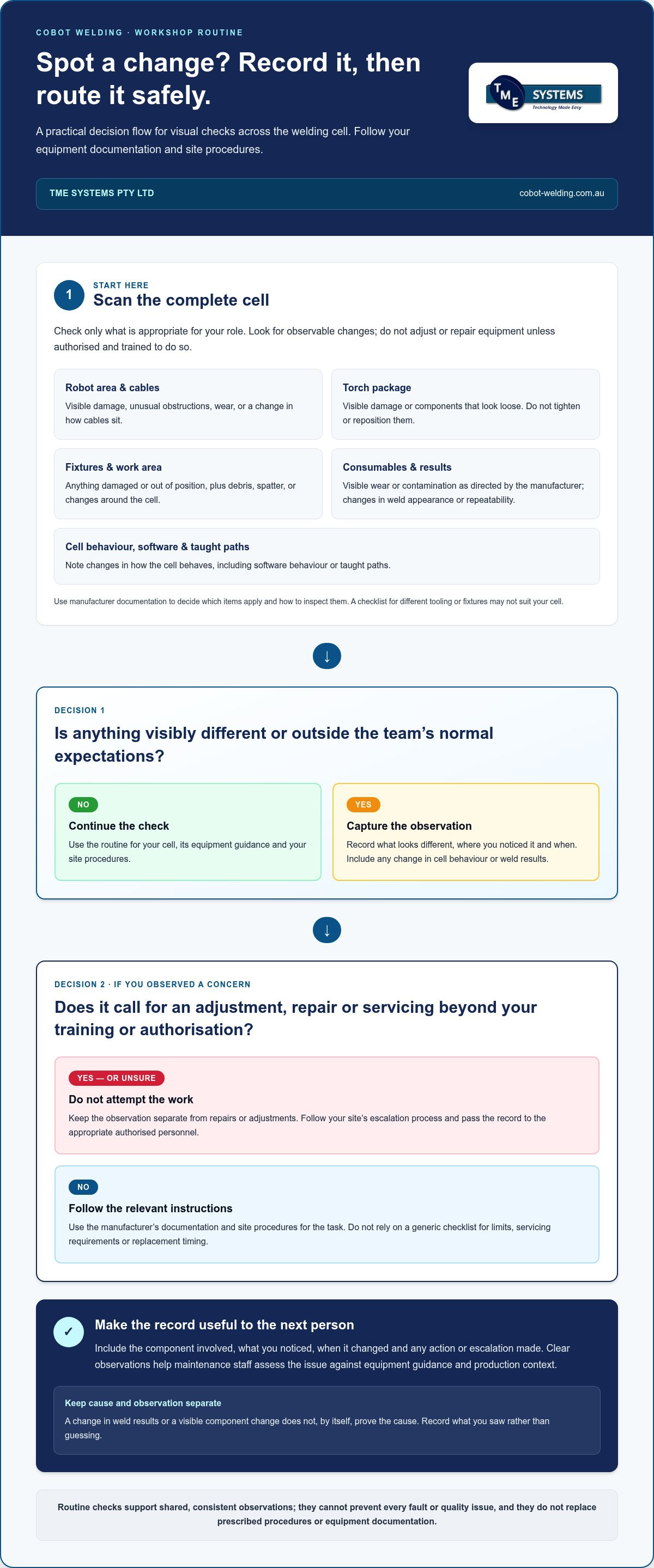
A checklist only helps when people know what to do with their findings. Give the routine a simple sequence: observe, record, assess and escalate. This keeps the cobot welding maintenance checklist focused on clear observations and appropriate next steps, rather than asking operators to diagnose faults or carry out work beyond their authorisation.
Include software and taught paths in the observation process. Operators can record an unexpected change in a displayed status, a recurring alarm or a path that appears different from normal. These are observations to document and pass on, not proof of a specific fault. Follow the system documentation for applicable functions and procedures rather than assuming it has features such as automatic diagnostics or backups.
Record observations, faults and weld changes
Make each entry specific enough for another person to understand what happened. Note the component, what was observed and relevant production context, such as the job or setup in use. Record recurring alarms or changes in weld appearance as observations, without guessing at a cause. Clear notes help authorised staff assess the issue alongside the cell’s equipment guidance.
- Observe: The operator checks the cell within site procedures and notes visible changes, unusual behaviour or a safety concern.
- Record: The operator logs the component, condition, relevant production context and time of observation.
- Assess: The responsible maintenance person reviews the record against equipment documentation and site procedures.
- Escalate: Maintenance staff arrange authorised technical attention when the issue needs work beyond the operator’s role.
Safety checks must follow the site risk assessment and relevant equipment procedures. If a safety concern arises, don’t bypass a safeguard or continue operating on the assumption that the cell is safe. Follow the site’s response and escalation process.
Escalate checks that require technical attention
Move an observation out of the operator checklist when it calls for an adjustment, repair, servicing or judgement beyond the operator’s training. Follow site procedures and manufacturer instructions to identify who is authorised to assess and act. If the cell’s behaviour, a taught path or a weld result changes unexpectedly, record the change and escalate it rather than attempting an unapproved fix.
Training makes this boundary practical. Operators should know what they can observe, where to record it, who receives an escalation and what to do if an issue remains unresolved at handover. No coding experience is needed to use the No-Code Teaching Software, but onboarding should still cover the cell, its welding equipment and fixtures, and the team’s agreed procedures.
To build a routine around your cell’s equipment, production process and team responsibilities, discuss your cobot welding setup with TME Systems.
Keep cobot welding maintenance practical with training and integration support
A checklist works best when it fits the way your team teaches, runs and supports the cell. Onboarding can clarify what operators are responsible for, how to record observations and who to involve when a check raises a concern. It also gives production and technical staff a shared starting point for refining the routine as collaborative welding becomes part of day-to-day work.
Build operator confidence without requiring coding experience
No coding experience is needed to use the No-Code Teaching Software. Welders and operators can teach and refine weld paths through an operator-focused interface. Training helps them understand the cell and the boundaries of their role, making it easier to recognise when the setup or its behaviour differs from expectations. On-site cobot welder training can connect operator onboarding with the way checks and escalations work in your production environment.
Keep the distinction clear: operator-led teaching does not make every maintenance task an operator task. Site procedures and equipment documentation guide what operators can inspect or change, and when an authorised person needs to assess an issue. Clear boundaries let operators take an active role without being expected to diagnose faults or carry out technical work beyond their training.
Plan support around the actual production environment
A cobot welding cell depends on more than the robot. Integration planning accounts for the welding equipment, power source, torch package, fixtures and production process working together. This context matters when setting up a maintenance routine, because a change in one part of the arrangement may affect how the cell operates. A practical welding system integration guide can help frame those connections.
MIG and TIG are supported when the robot, power source, torch package and process requirements are matched correctly. Integration should also reflect the parts being welded and how the team plans to run production. These details give operators and technical staff a more useful basis for training, observation and escalation than a generic checklist alone.
If you’re considering how no-code teaching could fit your workshop, explore no-code robot welding software as you map out the next steps. Then bring your production goals, the parts you need to weld and your operators’ onboarding needs into the planning discussion. These details help shape a checklist around the integrated cell and the people who use it.
Make your next production step a considered one
Your cobot welding maintenance checklist can develop alongside the work. As parts, production priorities or team responsibilities change, revisit how operators capture observations and how those notes inform technical support. This keeps the routine connected to the cell you’re running, rather than turning it into paperwork that no longer helps on the workshop floor.
Planning a first cell or refining an existing setup? Bring your parts, production goals and operator onboarding needs into the conversation. TME Systems provides No-Code Teaching Software, collaborative robot welding solutions, integration, demonstration, onboarding, training and support. No coding experience is needed to use the software, and training can help your team get familiar with collaborative welding.
Discuss your cobot welding goals with TME Systems and take a practical next step towards a routine that suits your people and production environment.
Frequently Asked Questions
Is coding experience required for using the software?
No, the software is designed for welders and operators regardless of robot programming experience.
Can the software be integrated with existing welding equipment?
Yes, TME Systems can discuss integration with a wide range of welding equipment, fixtures, and production processes.
What kind of support do you offer for new users?
Demonstration, onboarding, training, and support to help teams move confidently into collaborative welding.
Is collaborative robot welding safe for workers?
Designed around controlled interaction with operators; final safety requirements depend on the application, tooling, process, and site risk assessment.
Why is welding power source integration important?
Power source, wire feed, torch, communication method, and weld settings affect arc stability and repeatability; reviewing integration early helps avoid surprises during commissioning.
What parts are good candidates for robotic welding?
Parts with repeatable fit-up, sensible torch access, stable fixturing, and enough repeat work to justify teaching and proving the weld path.