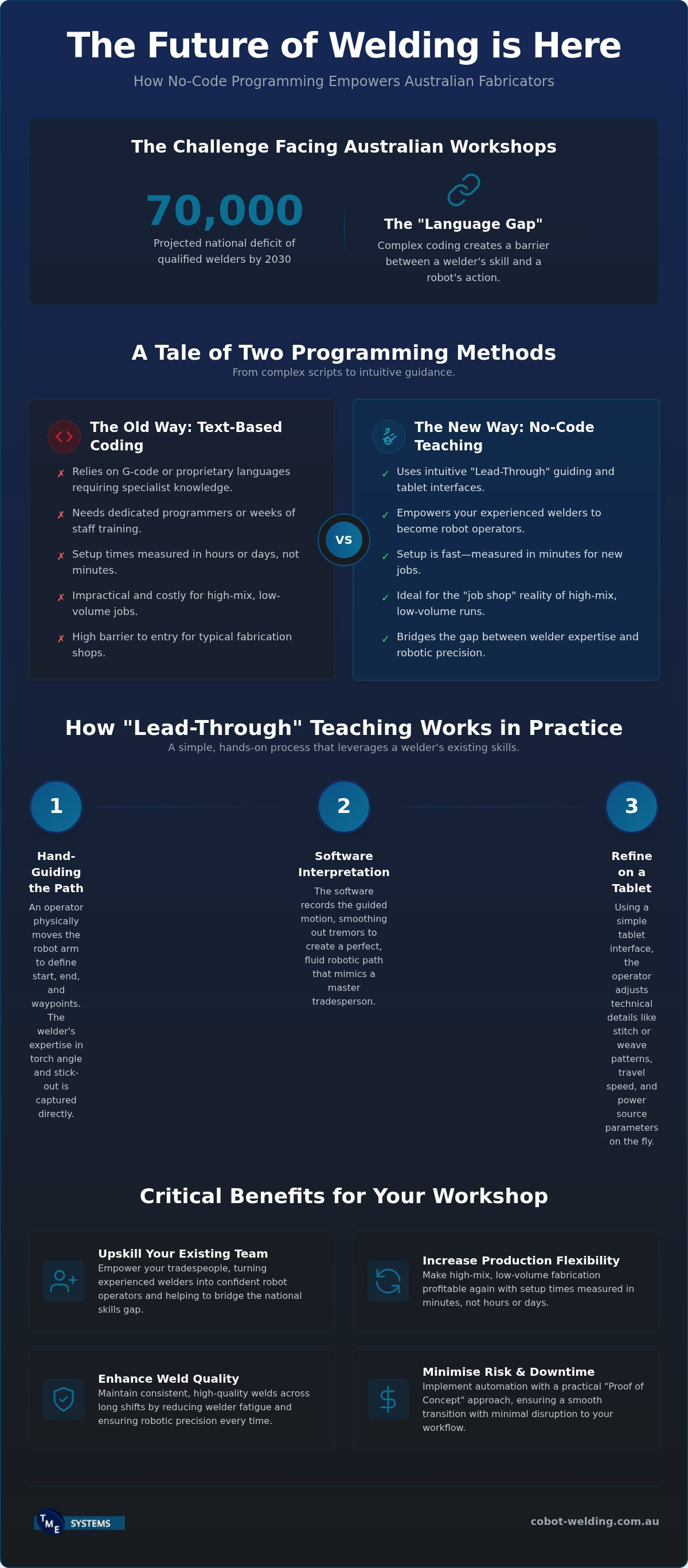

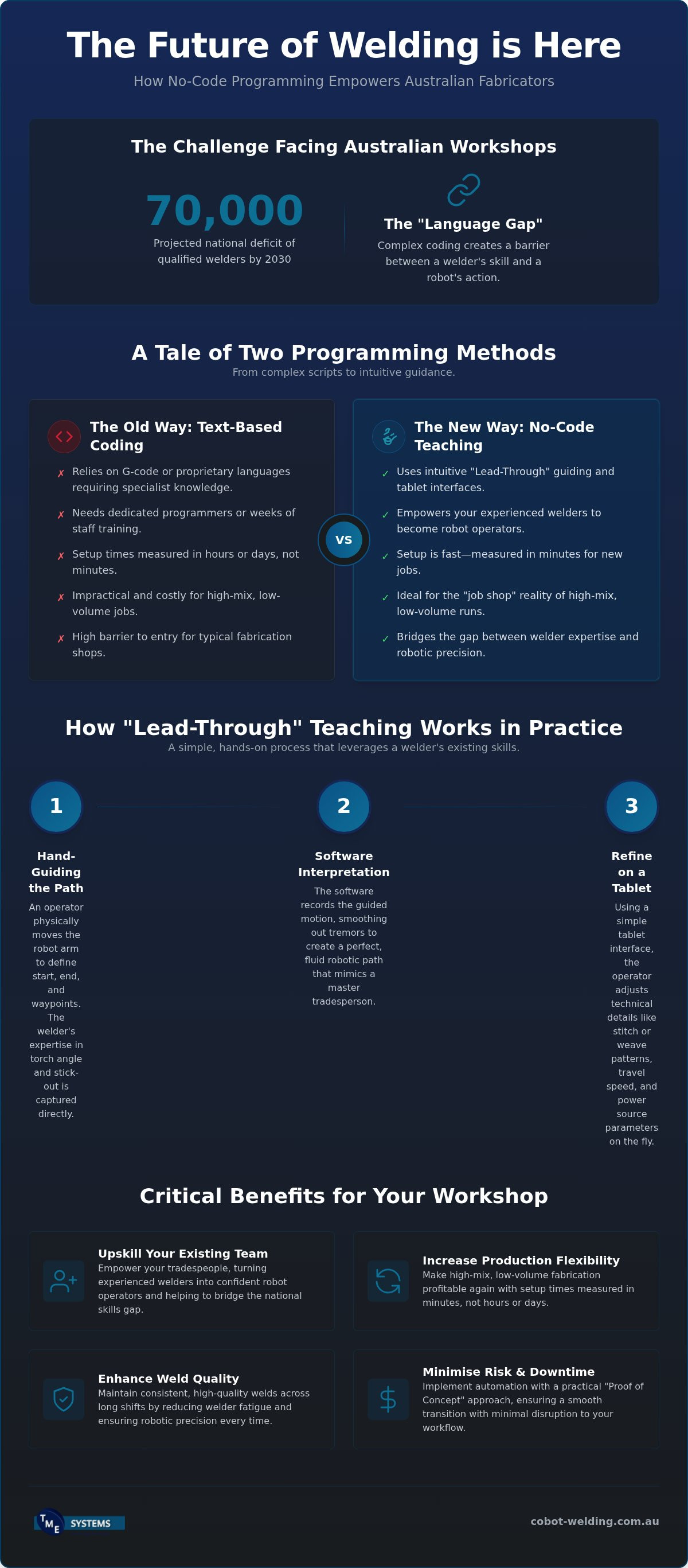
The most valuable person to programme your next welding robot isn't a software engineer; it's the experienced fabricator already standing on your workshop floor. We understand the pressure Australian shops are under, especially with a national deficit of 70,000 qualified welders projected by 2030. It's frustrating to see high-tech machinery sitting idle just because you don't have a dedicated coder to set up a small batch run. You've likely searched for how to program a welding robot without code so your tradespeople can focus on their craft rather than troubleshooting software.
This guide explores how modern no-code interfaces allow your team to lead a robot by the hand, literally, to create perfect welds in minutes. We'll show you how these intuitive systems reduce downtime and make high-mix fabrication profitable again. By the end of this article, you'll understand the 2026 software landscape, the practicalities of AS/NZS 4024.1 compliance, and how to upskill your existing workforce into confident robot operators without a single line of complex script.
Key Takeaways
- Understand how the industry has moved from text-based coding to intuitive software that acts as a bridge between a welder’s skill and the robot’s movement.
- Learn the practicalities of the "Lead-Through" method, where your operators physically guide the robot arm to teach paths rather than typing commands.
- Discover how to program a welding robot without code to empower your existing tradespeople and eliminate the need for expensive, specialised programmers.
- Identify essential software features like seamless integration with major power sources and the ability to easily adjust stitch or weave patterns via a tablet interface.
- Find out why a practical "Proof of Concept" approach is the most reliable way for Australian workshops to transition to automation with minimal risk.
What is Welding Robot Programming Software in 2026?
In 2026, welding robot software has moved beyond being a complex set of instructions for engineers. It's now the intuitive bridge between a skilled welder’s intent and a machine’s precise movement. For years, the barrier to automation was the "language gap" between the workshop floor and the robot controller. Today, no-code software has bridged that gap, allowing tradespeople to communicate directly with collaborative robots (cobots) using visual and tactile methods.
This shift is critical for Australian fabricators. With a projected national deficit of 70,000 qualified welders by 2030, we can't afford to have our best tradespeople bogged down by manual, repetitive tasks or complex computer programming. Modern software ensures that the "brains" of the operation remain with the person who knows the weld pool best. By focusing on Robot welding as a skill-multiplying tool, workshops can maintain high standards while boosting their output.
The Evolution from Traditional Coding to No-Code
Traditional robotic systems often relied on G-code or proprietary manufacturer languages. For a small Aussie shop, this meant hiring an expensive specialist or spending weeks training a staff member just to move a robot arm. It simply wasn't viable for small batches. The rise of no-code teaching software changed the game. Instead of typing command lines, operators now use tablet-based apps and "lead-through" teaching.
This is how to program a welding robot without code: you physically guide the arm to the start and end points, and the software handles the underlying geometry. It keeps your best welder at the centre of the process, refining the path based on their years of experience rather than their typing speed. Because the interface is visual, it's as simple as using a smartphone. Learning how to program a welding robot without code means your workshop can pivot between different jobs instantly, staying competitive in a fast-paced market.
Why Australian Workshops are Making the Switch
Most Australian fabrication happens in "job shop" environments. You might be doing ten trailer frames in the morning and fifty brackets in the afternoon. Traditional automation was too slow to set up for these high-mix, low-volume runs. No-code solutions allow for a faster turnaround because the setup time is measured in minutes, not hours. This flexibility is essential for local businesses trying to compete with overseas mass production.
Switching to this technology also addresses the physical toll on your team. Manual welding is fatiguing, especially across long shifts. By using a cobot as a tool, you maintain consistent weld quality and high throughput without burning out your staff. It’s about empowerment, not replacement. You’re giving your team a way to produce more while maintaining the high standards the Australian market demands. This approach turns a daunting technical transition into a practical workshop improvement.
How No-Code Teaching Software Works in Practice
Many software solutions require you to sit at a desk and model parts in a virtual environment. While that has its place, it often feels disconnected from the physical reality of the torch and the weld pool. No-code software changes this by focusing on "Lead-Through" teaching. Instead of typing coordinates into a terminal, the operator physically guides the robot arm through the required motion. This direct interaction makes the technology feel like another tool in the welder's kit rather than a separate IT project.
Hand-Guiding: Teaching by Doing
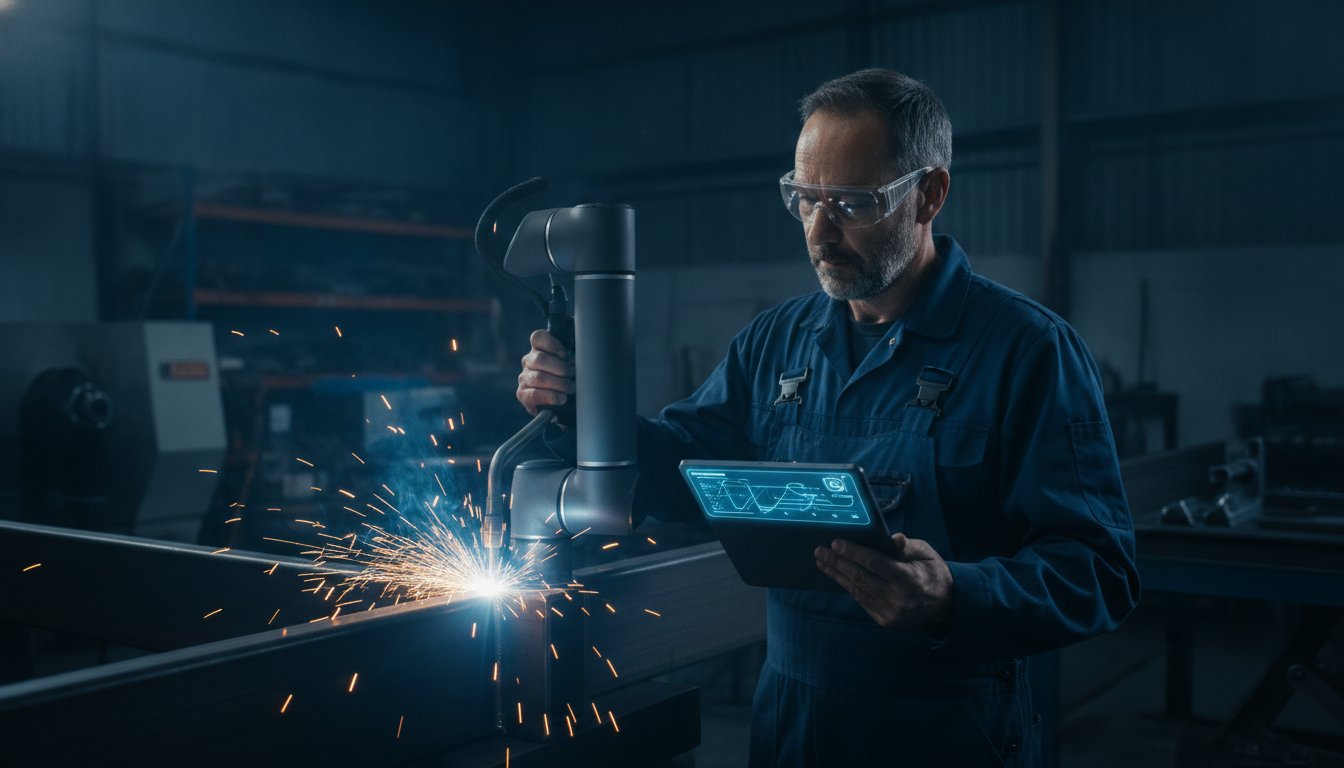
Hand-guiding allows a skilled welder to define start and end points by simply moving the cobot. Because the operator is right there at the workpiece, they can maintain the perfect torch angle and stick-out during the setup phase. The software is smart enough to smooth out any slight human tremors, creating a fluid robotic path that mimics the steady hand of a master tradesperson. This tactile approach ensures the robot follows the exact seam, even on parts with slight variations that a CAD model might miss.
Understanding how to program a welding robot without code means recognising that the software is doing the heavy lifting behind the scenes. No-Code Teaching is a method where physical movement is converted into robotic instructions in real-time. This allows your team to meet National competency standards for robotic welding without needing to learn a new computer language. It keeps the focus on the quality of the weld rather than the syntax of the code.
Adjusting Parameters on the Fly
Once the path is set, the operator uses a tablet interface to refine the technical details. You can adjust volts, wire feed speed, and travel speed with a few taps on the screen. It’s a drag-and-drop logic that feels familiar to anyone who has used a smartphone. You can easily add specific steps like cleaning cycles or wait times between passes to manage heat input, ensuring the structural integrity of the fabrication remains high.
This system also includes "weld libraries" to store your successful programmes. Once you’ve perfected the settings for a specific bracket or frame, you save it for future repeat orders. When that same job comes back in six months, you simply recall the settings and start welding immediately. It removes the guesswork and ensures that every batch is as consistent as the first. If you want to see how this fits into your production line, you can explore our collaborative robot welding cells designed for the Australian workshop.
Traditional Teach Pendants vs. Modern No-Code Software
For decades, the teach pendant was the only way to communicate with a robot. It was a heavy, button-heavy box that required a specialised dialect of code to function. If you wanted to change a weld path, you often had to call in an external contractor or a high-priced specialist programmer. This created a bottleneck for small Australian shops where the owner or the lead welder needs to be the one making the calls. Learning how to program a welding robot without code represents a fundamental shift in workshop psychology; it moves the control back to the person with the welding mask.
This technology replaces the intimidating command lines with an interface that looks and feels like a modern smartphone. While traditional methods like Offline programming of welding robots have improved over the years, they often still require a desk-bound engineer. No-code software allows the tradesperson to stay on the workshop floor, teaching the robot through movement and simple touch-screen adjustments. The cost implications are clear: you’re upskilling your existing team rather than adding to your overhead with niche IT roles.
The Learning Curve for Your Staff
Traditional robotic systems usually demand weeks of intensive training before an operator feels confident. Even then, the "fear factor" of breaking a complex programme can lead to staff hesitation. No-code software removes this barrier. Because the logic is visual and tactile, most operators become proficient and productive within a single shift. They aren't learning to be programmers; they are learning to use a more advanced welding torch. This rapid onboarding is vital for shops trying to manage the current national labour shortage without losing momentum.
Efficiency and Workshop Throughput
Why do so many traditional robots sit idle in Australian workshops? Often, it's because the setup time for a new part takes longer than the job itself. If it takes four hours to code a part that only requires thirty minutes of welding, the robot stays in the corner. No-code software slashes these setup times from hours to minutes. This makes it profitable to automate "one-off" jobs or small batches of ten to fifty pieces, which are the backbone of the local industry.
Rapid prototyping becomes a reality when you can adjust a path on the fly without waiting for a software expert to rewrite a script. This level of agility ensures your throughput remains high, even when your production schedule changes daily. For a deeper look at how this fits into your business model, read our No-Code Robot Welding Software: The Fabricator’s Guide to Accessible Automation. By focusing on how to program a welding robot without code, you ensure your machinery is always working for you, not waiting for a programmer.
Critical Features to Look for in Welding Software
Selecting the right software for your workshop goes beyond just looking at a tablet screen. It’s about ensuring the digital side of your operation integrates seamlessly with the heavy-duty hardware you already rely on. In Australia, this means looking for software that speaks the language of power sources like Fronius, Kemppi, and Miller. If the software doesn't offer deep integration with these brands, you’ll find yourself fighting the settings rather than welding parts. Local support is equally vital. You need "boots on the ground" technical assistance from a team that understands the Australian manufacturing landscape, not a helpdesk in a different time zone.
Weld Path Optimisation and Weaving
A key part of learning how to program a welding robot without code is mastering the technical nuances of the weld itself. High-quality software allows you to programme weave patterns for thicker materials with simple toggle switches. Instead of manually calculating oscillation paths, you select the weave type and width on your tablet. The system should also automatically adjust torch angles to ensure deep penetration, whether you’re running a MIG or TIG process. This level of control ensures that your robotic output matches the high standards of your manual tradespeople.
Safety and Collaborative Features
In a collaborative environment, safety isn't a "nice-to-have" feature; it's a non-negotiable requirement. Your software must include robust collision detection to prevent expensive damage to the robot arm or your fixtures. It should also allow you to set software-level safety zones, ensuring the robot stays within its designated workspace. When integrated with collaborative robot welding cells, these features create a workspace where humans and machines work side-by-side without the need for bulky safety fencing.
By focusing on these practical features, you ensure that your investment in automation delivers results from day one. You aren't just buying a gadget; you're refining your production process. If you're ready to see these features in action, you can book a mobile demonstration to see how our systems handle your specific fabrication challenges. This hands-on approach is the best way to understand how to program a welding robot without code while maintaining workshop safety and efficiency.
Implementing No-Code Solutions in Your Workshop
Transitioning to robotic welding shouldn't feel like a leap of faith for your business. The most successful implementations in Australian workshops start with a clear "Proof of Concept." This means seeing the software and hardware handle your actual production parts on your own floor before you commit. By opting for a turnkey solution—where the software, cobot, and integration are handled by a single partner—you significantly lower the operational risk to your shop.
The Integration Journey with TME Systems
Selecting the right software depends entirely on your specific fabrication requirements. We work closely with you to identify the high-volume or repetitive jobs that will benefit most from automation. A mobile welding robot demonstration is often the best first step for local fabricators. It allows your team to see exactly how to program a welding robot without code using your own materials and workshop jigs.
Once the system is installed, our commitment to on-site cobot welder training ensures your staff feel confident and capable. We don't just deliver a crate and leave; we provide the specialised support needed to make the transition seamless. This hands-on training is what turns a new piece of technology into a reliable workshop asset that your team actually wants to use.
Maximising ROI from Day One
The primary goal of automation is to improve your bottom line by reducing scrap and rework. Software-driven consistency ensures that every weld is identical to the last, which is incredibly difficult to achieve manually over a long shift. Modern integration aims for a system that pays for itself through increased uptime and reduced overhead.
We often suggest starting small. By automating the simplest, most repetitive 20% of your current workload, you gain immediate momentum and see a faster return on investment. This shift frees up your senior welders to focus on complex, high-value manual tasks that require their years of expertise. It’s a practical way to scale your output without the stress of finding new staff in a competitive market. When you master how to program a welding robot without code, you aren't just adding a machine; you're building a more resilient, productive organisation.
Future-Proofing Your Workshop with Accessible Automation
The shift toward intuitive automation is no longer a luxury for Australian fabricators; it's a practical necessity to stay competitive. By removing the need for proprietary languages and high-priced specialists, your workshop can finally bridge the gap between human skill and robotic precision. We have explored how specialised no-code teaching software allows your tradespeople to remain the masters of the weld pool while the machine handles the repetitive heavy lifting.
Learning how to program a welding robot without code is about more than just software; it's about giving your team the tools to succeed in a high-mix, low-volume market. With our national on-site training and support, we ensure your transition to collaborative welding cells is smooth and low-risk. Our turnkey systems are designed to fit into your existing workflow, providing immediate consistency and throughput gains from the first shift.
Ready to see the difference for yourself? You can book a mobile demonstration to see no-code welding in action at your workshop. We'll bring the technology to you, allowing your team to experience firsthand how accessible automation can transform your production line. Let's build a more productive future for your workshop together.
Frequently Asked Questions
Do I need a computer science degree to use welding robot programming software?
You don't need a degree or any coding background to operate these systems. The software is built specifically for tradespeople who understand the welding process but aren't software experts. By using a tablet interface and physical movement, the system translates your actions into instructions. This is exactly how to program a welding robot without code; you use your existing fabrication skills to lead the machine rather than typing lines of script.
Can no-code software handle complex weld paths or just straight lines?
Modern software easily handles complex geometries, including curves, stitch welds, and weave patterns. You aren't limited to simple straight lines. By physically guiding the cobot arm through the required path, the software records the exact movement and torch angle. You can then refine the weave width or travel speed on the tablet. This allows the robot to tackle intricate joints that were previously only possible with manual welding.
Is the software compatible with my existing MIG or TIG welder?
Yes, no-code solutions are designed to be highly compatible with the major power sources used in Australian workshops. Whether you're running MIG or TIG processes from brands like Fronius, Kemppi, or Miller, the software integrates directly to control weld parameters. This seamless connection ensures that you can adjust wire feed speeds and voltages directly from the robot's interface, creating a unified system that works with your existing hardware.
How long does it take to train a manual welder to use the software?
Most manual welders become proficient and productive with the software within a single eight-hour shift. Because the logic is based on physical movement and visual icons, the learning curve is remarkably shallow. Our comprehensive operator onboarding and training focus on the practical application of the tool. Your team will spend less time in a classroom and more time on the workshop floor, gaining the confidence to set up new jobs independently.
Does the software allow for offline programming as well as hand-teaching?
Yes, many modern systems offer the flexibility of both hand-teaching and offline programming. While hand-guiding is perfect for quick setups on the floor, offline options allow you to prepare programmes on a computer without stopping the robot's current production. This dual approach ensures your workshop stays productive. You can learn how to program a welding robot without code on the fly or plan more complex sequences in advance to maximise your machine's uptime.
What happens if the robot hits a fixture during a new programme?
Collaborative robots are equipped with sensitive collision detection and software-level safety zones to prevent damage. If the arm encounters an unexpected obstacle like a fixture or a workpiece, it stops instantly to protect the equipment and the operator. You can then simply reset the position and adjust the path on the tablet. This built-in protection is a critical part of AS/NZS 4024.1 compliance and ensures a safe environment for your team.
Can I save and reuse programmes for parts I only make once a year?
You can absolutely save every programme into a digital weld library for future use. This is a major advantage for job shops that handle repeat orders once or twice a year. Instead of re-teaching the path, you simply recall the saved file and start welding immediately. It removes the setup bottleneck for small batches and ensures that the weld quality remains identical to the original run, regardless of how much time has passed.
Is there local Australian support if the software has a glitch?
TME Systems provides dedicated national support and technical assistance across Australia. We understand that downtime is costly, so we offer "boots on the ground" service to resolve any software or hardware issues quickly. Our team is local, meaning we operate in your time zone and understand the specific challenges of the Australian manufacturing sector. You'll have access to expert advice and ongoing maintenance to keep your production lines running smoothly.